herdr-jump
Your agents, one key away from any app. One key back to your terminal, one key to the agent that needs you, and a menu bar icon that counts the agents waiting for you. It needs only a running Herdr: no plugin, nothing to set up inside Herdr.
curl -fsSL https://raw.githubusercontent.com/MrBogomips/herdr-tools/main/herdr-jump/install.sh | sh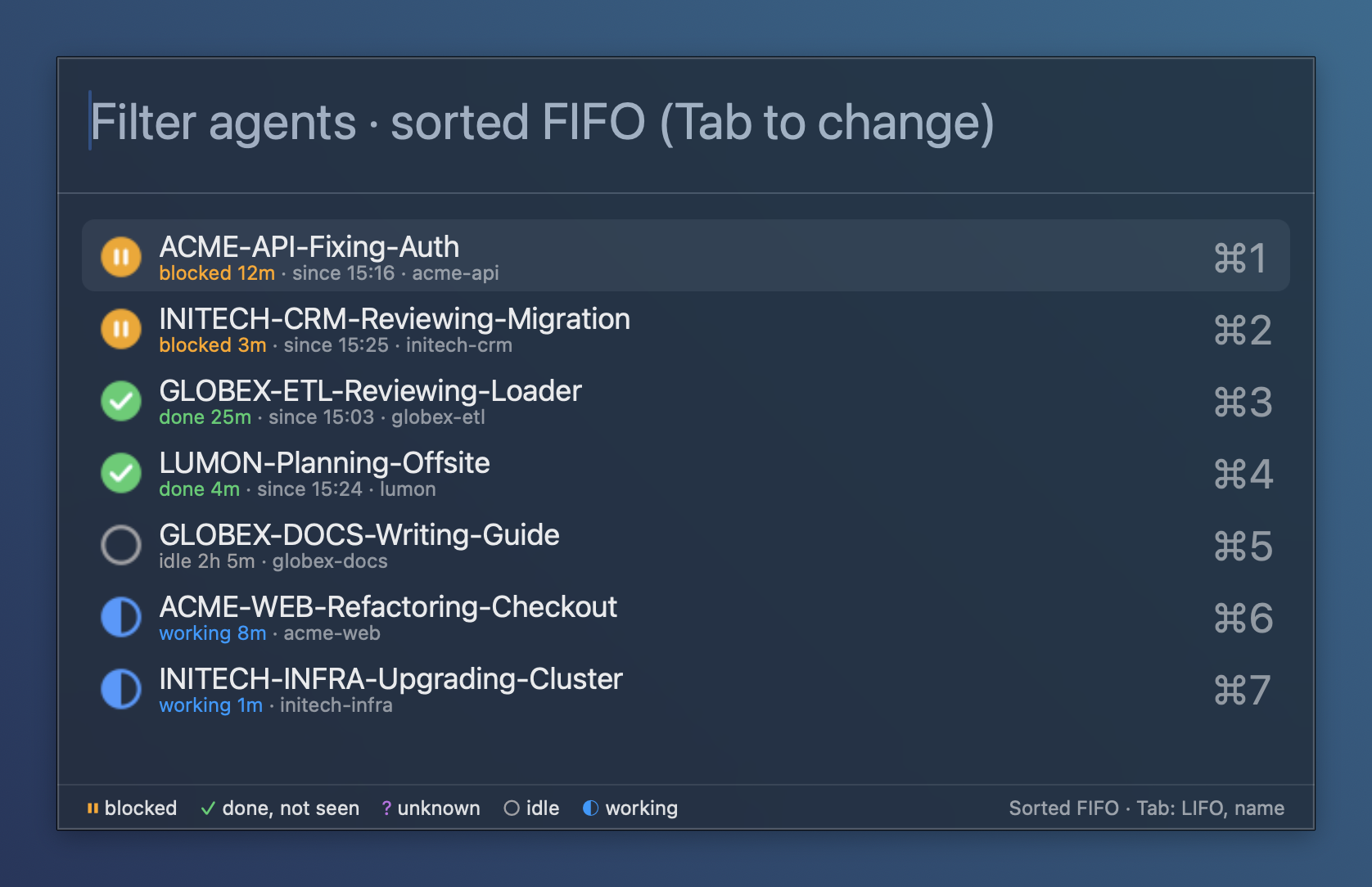
Run five agents. Serve them in turn.
They queue up for you: a permission here, a finished review there. herdr-jump lines them up first come, first served, tells you how long each one has waited, and takes you to its pane with Enter.
A permission, while you browse
The icon turns solid with a count. ⌃⌥⌘A opens the picker with that agent on top; Enter lands you on its pane, terminal window and tab in front.
Done during a meeting
The picker queues finished agents oldest first, each with its wait (“done 25m · since 10:40”). Each one leaves the count once you have looked at it.
Latest answers first
Tab sorts newest first: the agent that just finished is on top, blocked ones still first. Tab again sorts by name. The choice is remembered.
Back and forth
⌃⌥⌘I brings your terminal forward on the window you used last; pressed again from the terminal, it goes back to the app you came from.
Two keys, from any app
| Key | What happens |
|---|---|
| ⌃⌥⌘A | The agents picker, most urgent first: blocked, done, unknown, idle, working; within a status the oldest change first. Type to filter by title or folder, Enter to jump. |
| ⌃⌥⌘I | Activates the terminal running Herdr, where it keeps its focused pane; from the terminal, back to the previous app. |
| Tab in the picker | Next sort: FIFO (default), LIFO, then by name. The filter you typed stays. |
Both keys can be changed, see Configure.
Whatever terminal runs Herdr
herdr-jump finds the terminal that runs the Herdr client by itself, climbing from the client's process to the app that started it.
| Terminal | A jump brings forward |
|---|---|
| iTerm2 | the window, tab and session running Herdr |
| Terminal | the window and tab running Herdr |
| Ghostty, WezTerm, kitty, Alacritty, Warp, VS Code… | the app, on its last used window |
Herdr inside tmux or over ssh hides its terminal: the keys then bring forward terminalBundleID
(iTerm2 when installed, else Terminal). Diagnostics, in the menu, says what was found and why.
A glance instead of a switch

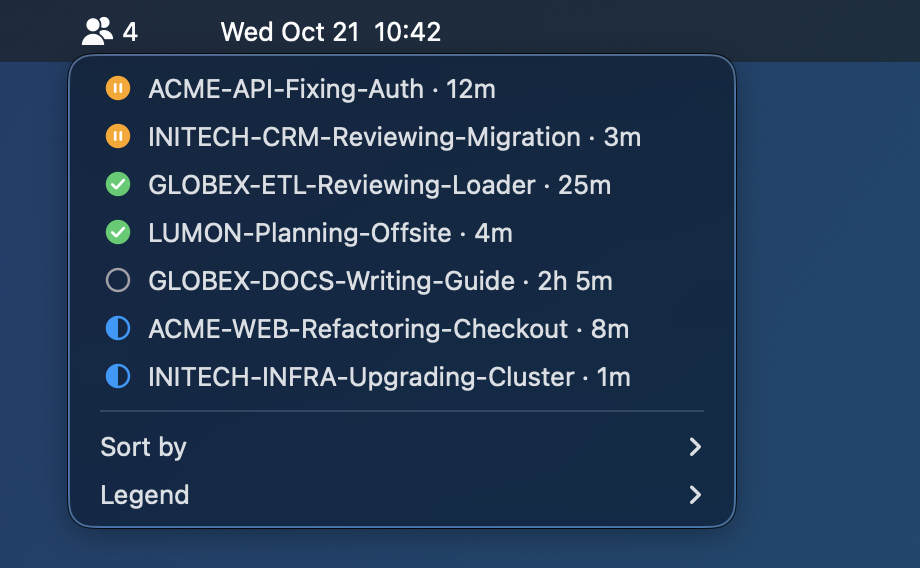
Click the icon for the same list as the picker, as a menu, with Sort by, a Legend and
Diagnostics: the herdr, socket and terminal herdr-jump found, ready to copy.
Symbols
A filled icon waits for you, an outlined one does not.
| Icon | Colour | Status |
|---|---|---|
| Disc with pause bars | orange | blocked: waiting on a permission or a question |
| Disc with a check mark | green | done: finished, not seen yet |
Ring with ? | purple | unknown: listed, never counted |
| Empty ring | grey | idle, or done and already seen |
| Half-filled ring | blue | working |
Waits read 12m, 1h 5m, 2d 3h, with the start time for agents that wait for you
(since 09:41). The queue order comes from Herdr's own change counter, so it is exact.
One line to install, the same line to update
Requirements: macOS, Herdr 0.9.5 or newer in a terminal, and Homebrew if Hammerspoon is not installed yet.
curl -fsSL https://raw.githubusercontent.com/MrBogomips/herdr-tools/main/herdr-jump/install.sh | shThe script asks nothing and prints what it does:
- installs Hammerspoon with Homebrew when it is missing;
- downloads
HerdrJump.spooninto Hammerspoon'sSpoonsfolder (~/.hammerspoon, or the folder itsMJConfigFilesetting names), replacing the previous copy; - creates
init.luawhen you have none, or appends the HerdrJump lines to yours, with theherdrand the Herdr socket your shell uses; - reloads Hammerspoon, or starts it.
To see what herdr-jump needs and finds on a Mac, changing nothing:
curl -fsSL https://raw.githubusercontent.com/MrBogomips/herdr-tools/main/herdr-jump/install.sh | sh -s -- --checkTo read the script first, or to install a branch or a release tag:
curl -fsSL https://raw.githubusercontent.com/MrBogomips/herdr-tools/main/herdr-jump/install.sh -o install.sh
less install.sh
sh install.sh --ref <branch-or-tag>
macOS asks for Accessibility for Hammerspoon (global hotkeys) and, on the first jump, Automation: Hammerspoon → iTerm2 (or → Terminal) to select the Herdr tab.
Standalone. herdr-jump needs only a running Herdr server: no Herdr plugin, from herdr-tools or anywhere
else, and nothing to change in your config, spaces or tabs. It reads the server with the herdr command
that ships with Herdr (herdr agent list, then herdr agent focus on a jump), so it works with
any Herdr setup, plugins or none.
It is not a Herdr plugin itself: it runs in Hammerspoon, outside Herdr, so the plugin marketplace does not list it.
Configure
Set these in Hammerspoon's init.lua before start():
hs.loadSpoon("HerdrJump")
spoon.HerdrJump.pollSeconds = 10
spoon.HerdrJump:bindHotkeys({
  terminal = { { "ctrl", "alt", "cmd" }, "t" },
  agents = { { "ctrl", "alt", "cmd" }, "space" },
})
spoon.HerdrJump:start()| Setting | Default | Meaning |
|---|---|---|
herdrBin | found | The herdr binary; unset, it is looked for in Homebrew, Herdr's installer
(~/.local/bin), cargo, Nix, MacPorts and mise folders |
socketPath | ~/.config/herdr/herdr.sock | The Herdr server socket
(herdr status server prints yours) |
terminalBundleID | iTerm2, else Terminal | The terminal to bring forward when no Herdr client shows its own |
pollSeconds | 5 | How often the agent list is read |
showMenubar | true | Show the menu bar icon and count |
defaultOrder | "fifo" | "fifo", "lifo" or "name" until you choose one |
Good to know
- Only agents in Herdr: agents in plain terminal tabs or in tmux are not listed.
- With Herdr clients in several terminals, a jump brings forward the first one found.
- Terminals other than iTerm2 and Terminal come forward as an app: their tab is not selected.
- The count can lag by up to
pollSeconds.