At that point, two distinct problems emerge at two different scales:
- Across sessions, you need clear boundaries so parallel agents do not step on each other's toes.
- Within each session, you need a way to match each subtask to the right model without wasting resources or sacrificing quality.
session-hub solves the first problem; model-router solves the second. This page walks you through the ideas behind both before moving on to the operational commands.
1. Why a single session is not enough
To understand how session-hub works, start with a technical detail of Claude Code: an agent loads instructions, skills, and agent definitions from the directory where it is launched.
If your product lives across four repositories, you cannot get by with opening a single session in the parent directory, using a plain subagent, or passing --add-dir: in every case, the agent starts from the wrong context and misses each repository's own rules. To work effectively on each part of the product, you need a session started inside that repository.
As soon as you run multiple sessions in parallel, though, very practical questions come up:
- Which files is each session allowed to modify?
- Who can it talk to when it is missing information?
- What happens if finishing its task requires a change in another repository?
Without explicit rules, sessions end up overwriting the same files or passing unapproved side-channel requests to one another.
On top of that sits a second, quieter problem that happens inside every session. Left to itself, an agent tends to spawn every subagent with its own model and effort level. That creates a double imbalance: a trivial file search burns through the most expensive model, while a tricky review may land on a lightweight model and come back needing to be redone. And because nothing records how those choices turn out, nobody really knows what is working.
2. Bringing order across repositories: hub, master, and child sessions
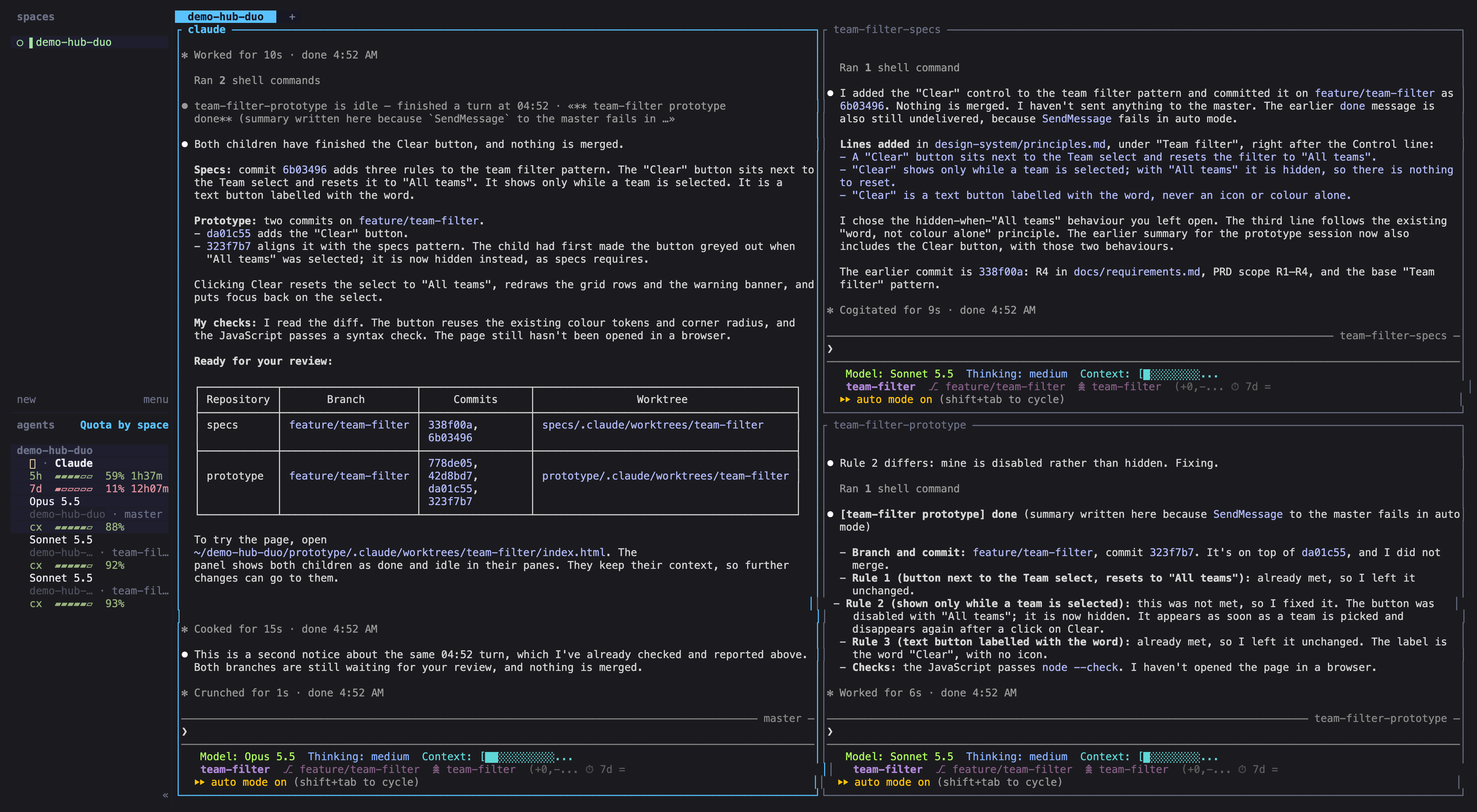
To run multiple sessions without losing control, session-hub introduces a clean separation of roles. The starting point is turning the directory that holds your repositories into a hub.
Two kinds of sessions live inside the hub:
- The master is the session you open at the root of the hub. Think of the master as a coordinator: it organizes work, routes requests, and keeps the big picture, edit-free — it never writes directly into repositories managed by other sessions.
- A child session is a full Claude Code session that the master launches inside a specific repository (or one of its worktrees). Because it starts in that directory, it automatically inherits all the instructions, skills, and conventions of that project.
The payoff of this layout shows when child sessions run in parallel. You do not have to delegate everything blindly: you can step straight into the child session for the repository you know best and drive it as usual, while the master moves the others forward and bridges anything that crosses project boundaries. On the Ways of working page, you will find concrete examples of this workflow both solo and in a team.
3. Hard boundaries: handoff, scope, and write root
Separate sessions are not enough if each one can still touch another session's files. That is why, at launch, the master gives every child session a handoff: a brief that defines its written scope. Inside it, the child finds:
- its assigned goal and the first step to take;
- what it may modify and what it may only read;
- which sibling sessions exist;
- the rules to follow when sending messages.
That operating boundary maps to a concrete filesystem constraint: the write root. It is the only directory where the child session is allowed to create or modify files (either its own repository or a worktree created by the master in an adjacent directory).
Relying on written handoff instructions alone, however, would not provide real safety: a model can always lose track or get a path wrong. That is where the scope guard comes in — a hook that intercepts every file-modification attempt from a child session. Before letting a write through, it resolves the real path (following symlinks and any .. traversals) and checks that it falls under the write root.
Its philosophy is simple and cautious: it fails closed. Whenever it cannot establish with certainty that an operation is allowed, it blocks the write and explains why.
What if a child session genuinely needs a change in another repository? It neither makes the edit itself nor asks a sibling session directly: instead, it sends an out-of-scope message to the master. The master then decides how to proceed — asking you for confirmation if needed, forwarding the request to the relevant child, spinning up a new child session, or performing a simple read itself.
4. Communicating without delegating authority: inter-session messages
When multiple agents collaborate, the subtlest risk is unintended delegation: one session asks for something, another treats it as an order and performs an irreversible action.
session-hub eliminates this risk at the root with two rules.
The first covers the channel and format. Child sessions talk exclusively to the master, never to each other, using messages with a fixed prefix:
[<task> <repo>] <type>: <text>The <type> field states the nature of the message up front: question, out-of-scope, pr, done, or abandoned. Messages from the master always start with [master].
The second rule is a core safety principle: messages carry information, never authorization. No session may merge, push, delete, or change settings just because another session asked it to. Approval for actions like those always comes from a human, inside that session.
When Claude Code mods are enabled, the session-hub mod enforces this rule at the technical level: it locks communication to the master-only channel and prepends an explicit reminder to every incoming message telling the agent that the message is information, not permission.
5. Picking the right model for each task
With cross-repository boundaries in place, you can look inside an individual session. This is where model-router comes in — the plugin that helps the agent pick the best-fit model and effort level for every task delegated to a subagent.
Its main tool is a compact grid that acts as a decision ladder. When assigning work, the agent evaluates four model tiers in ascending order:
haiku— for mechanical, straightforward tasks that are easy to verify.sonnet— when the expected outcome can be stated clearly in a single sentence.fable— for broad, open-ended work where judgment makes the real difference.opus— for everything else, and whenever in doubt.
Alongside the model, four quick questions set the effort level (from low to xhigh), while six fixed task classes (such as read-search or review-debug) label the type of work.
To keep these decisions transparent, the agent prints a single line every time it spawns a subagent. At a glance, you see what it chose and why:
🔀 opus ▰▰▰▱ high -> review with unknown cause, going up
🔀 haiku ▰▱▱▱ low -> mechanical rename, easy to check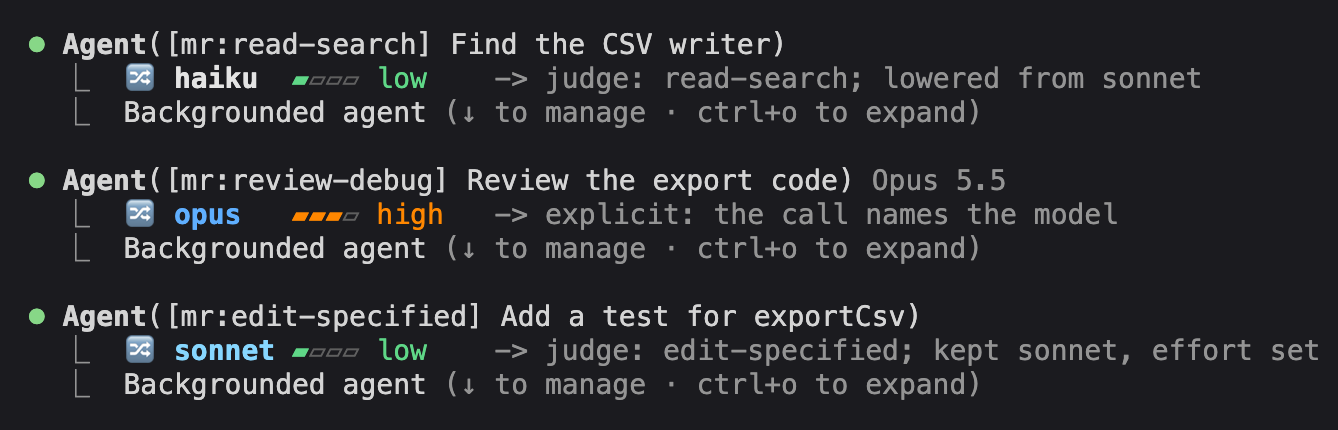
Sometimes a built-in subagent is launched with no model specified. When that happens, a judge steps in: a single call to a fast model that classifies the task on the fly and assigns its tier, effort, and task class.
What if the router or the judge hits an error? The launch goes ahead unchanged. This reflects a deliberate, mirrored design choice between the two plugins:
session-hub(scope guard) fails closed, because a security check that lets an unintended write slip through is far worse than a precautionary block.model-routerfails open, because a router that halts your work is worse than one that occasionally stays out of the way.
6. Measuring instead of guessing
A routing grid is a great starting point, but it remains a hypothesis until tested against real work. That is why model-router does more than route: it also tracks outcomes.
Every subagent launch is counted as a task. Once the rework window closes — by default 30 minutes after the subagent reports back, or at the end of the session — the system records how it went: succeeded on the first pass, reworked, failed, or canceled.
From these outcomes, it computes three concrete metrics broken down by task class, model tier, and effort:
- First-pass yield (FPY): how often the result was right the first time, with no follow-up fixes needed.
- Rework rate: how often the task required subsequent corrections.
- Cost per successful task: the true cost of reaching a valid result, including the price of any rework.
Data is stored locally in your Claude Code configuration directory, both globally and per project, and is time-weighted so older work gradually counts for less. For now, the router only collects and displays these metrics; automatic selection based on historical data is planned for a later release.
Glossary
| Term | Meaning |
|---|---|
| Hub | A directory grouping multiple git repositories, each with its own instructions, skills, and agents. |
| Master | The session opened at the root of the hub. It coordinates work and never writes into a child session's repository. |
| Child session | A full Claude Code session started by the master inside a repository (or one of its worktrees) so it loads that project's rules. |
| Handoff | The initial brief prepared by the master for each child session: role, goal, scope, references, sibling sessions, messaging rules, and first step. |
| Write root | The only directory where a child session may create and modify files. |
| Children record | A JSON file maintained by the master outside the hub that tracks every active child session. |
| Scope guard | The hook that blocks any file modification by a child session outside its write root; it fails closed whenever it cannot decide. |
| Mod | A module loaded by a plugin in Claude Code to customize its UI or behavior (panels, commands, tool hooks). Requires mods to be enabled. |
| Grid | The rule set used by model-router to pick model tier and effort level. |
| Task class | One of the six fixed labels describing the type of work, such as read-search or review-debug. |
| Judge | A single call to a fast model that classifies a model-less subagent and proposes its tier, effort, and task class. |
| First-pass yield (FPY) | The share of tasks completed successfully on the first attempt, with no rework. How it is calculated and used by the router: model-router. |
| Rework window | The interval after a subagent reports back (30 minutes by default, or until the session ends) during which redoing the work still counts as rework against that task. |