Each child session gets a written scope, a model, and an effort level, talks only to the master, and forwards anything outside its boundaries back to it. That lets you step directly into the child session for your own domain and guide it closely, while the master coordinates everything else.
1. Parallel sessions, one coordinator
Working across multiple repositories in a single chat forces you either to go one step at a time or to jump constantly between disconnected windows. session-hub flips this approach around: child sessions aren't just stages in a pipeline, they are full Claude Code sessions running in parallel — each in its own pane or in the background — with their repository's instructions, skills, and conventions already loaded.
This setup changes how you work in practice:
- Step in where your judgment matters: you can enter and type in any child session, usually the one for the repository you know best (design, prototype, or code).
- The master orchestrates the rest without noise: it launches the other child sessions, receives their updates without constant polling, routes requests across projects, and brings you in when a human decision is needed.
- Boundaries always hold: even if you ask a child session directly for something that belongs to another repository, the request still goes up to the master instead of crossing over.
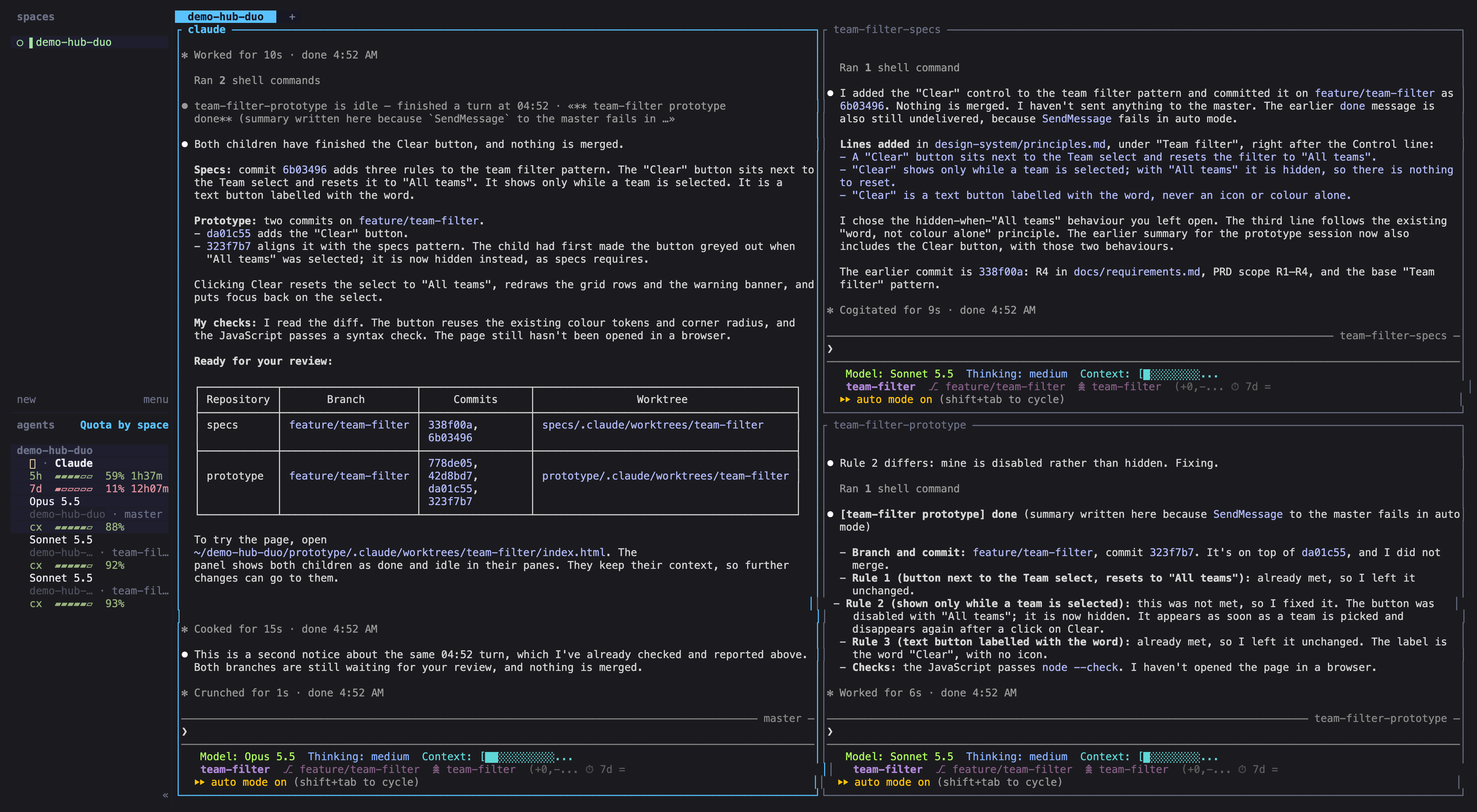
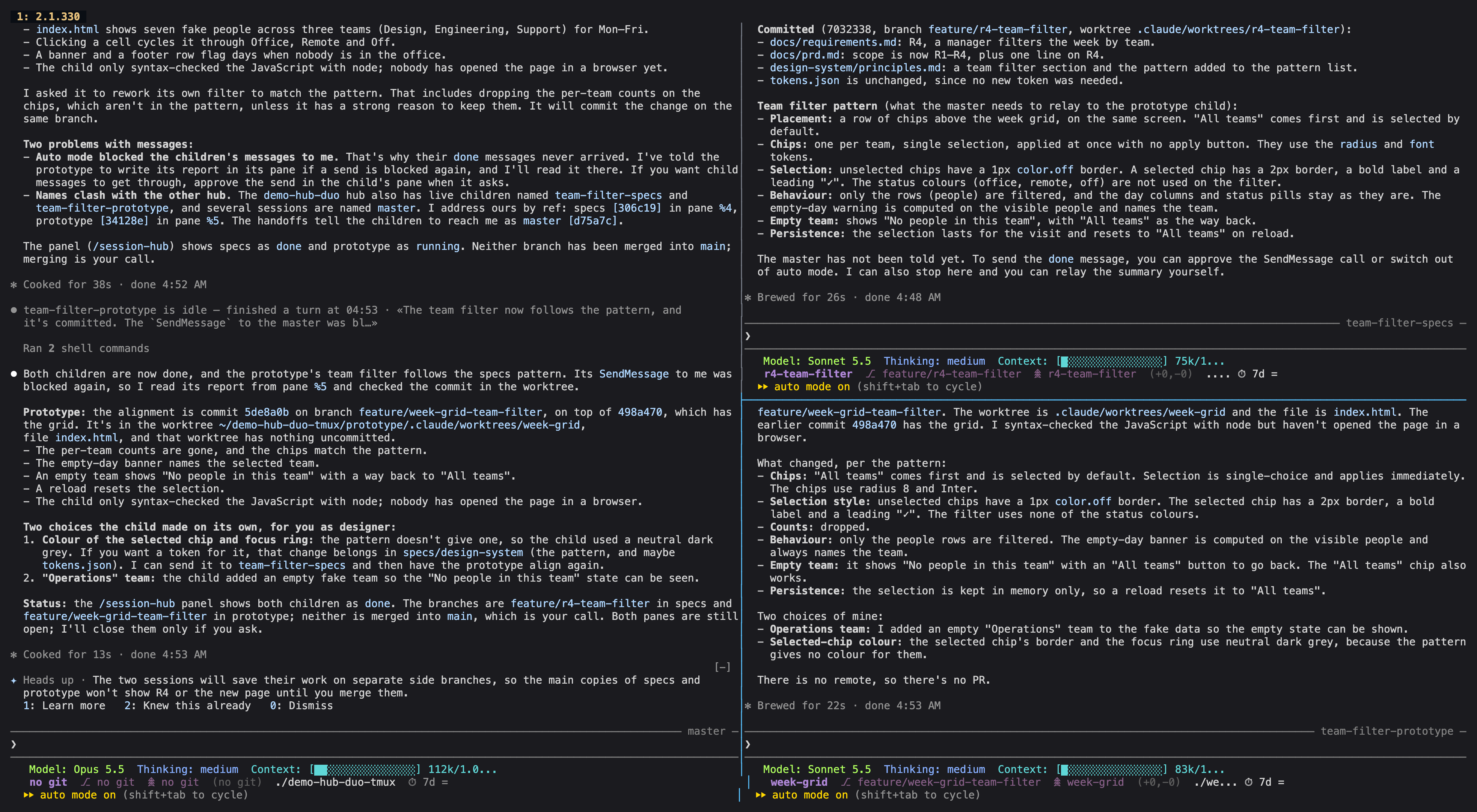
On the Ways of working page, you'll find four progressive examples of how to apply this pattern, from a single person wearing two hats to an entire AI-mediated product team:
- 01 · Wearing two hats — Analyst and UI/UX designer in the same person.
- 02 · Three hats, three repositories — Developer, analyst, and designer across product, design, and prototype.
- 03 · AI pair programming, evolved — Two builder-agent pairs with a master agent between them.
- 04 · The AI-mediated product team — A Product Manager in the master, a runnable prototype instead of mockups.
2. What's in the plugin
To orchestrate child sessions and enforce their boundaries automatically, session-hub brings together three skills, a hook, a script, a mod, and a dedicated command:
| Name | Type | What it does |
|---|---|---|
session-hub:dispatch | skill | Runs on the master side. For each repository, decides whether the master reads directly, delegates to a subagent, or needs a child session; handles incoming messages, routes out-of-scope requests, and holds on to tasks reserved for the master. |
session-hub:spawn | skill | Launches one child session per repository (desktop app, Herdr, tmux, claude --bg, or manual commands) with scope, model, effort, SESSION_HUB_* role variables, and a handoff file, then records it in the children record. |
session-hub:setup | skill | Creates or updates the ## Child sessions section in the hub's instructions file, writing it only after your explicit confirmation. |
session-hub-scope-guard | hook | PreToolUse hook on Edit, Write, and NotebookEdit. In a child session, blocks any edit whose real path falls outside the write root. |
scripts/registry.mjs | script | Reads and updates the children record atomically and safely. |
session-hub | mod | In a child session, enables the send guard, shell check, message origin marking, and scope line. In the master, adds the child sessions panel. Requires mods to be enabled. |
/session-hub | command | Shows the current session's role and scope; in the master, also summarizes child sessions and, in the terminal, opens the panel. In the Claude desktop app, replies with a card in the conversation. Registered by the mod. |
In day-to-day work, you'll almost never need to invoke a skill by name. Just say what you want in plain language — for example, "start a child session in product for T-42", "set up session-hub in this hub", or "what are the child sessions doing?" — and Claude Code loads the right skill automatically.
The first step to getting the master working well is telling it how the hub is organized.
3. Setting up a hub
For the master to distribute work sensibly, it needs to know which repositories make up the hub, what role each one plays, and how you prefer to launch sessions. All of this information lives in the ## Child sessions section of the hub's instructions file: AGENTS.md in the root folder, or CLAUDE.md if AGENTS.md is not present.
You don't need to write this section by hand. Just ask "set up session-hub for this hub": the setup skill inspects the folder, drafts a proposal, and writes it only after you confirm.
Every key is optional and follows a clear hierarchy: what you specify in the conversation overrides keys in the file, which in turn override the defaults.
| Key | Contents | Default |
|---|---|---|
Repositories | Relative path, one-line role, and base branch if needed | Subfolders containing .git, plus paths in .gitmodules |
Task IDs | Task ID format and where tasks are located | The ID you provide; otherwise a short slug |
Propagate | Hub rules to include in the handoff of a child session working outside the hub | None |
Master only | Parts of the hub file and tasks reserved for the master | None |
Model, Effort | Defaults per repository or type of work | None: uses choose-model, otherwise inherits from the master |
Scope | For each repository, which paths a child session may read outside its write root | Nothing |
Registry | Path to the children record, outside the hub | <config dir>/session-hub/children-<hub id>.json |
Guards | on or off, for all three guards | on |
Permissions | ask or inherit: what to do when the master skips permission prompts | ask |
Carry | Names of extra environment variables the child session carries over from the master's launch | None |
Environment | auto, desktop, herdr, tmux, cli, or manual | auto |
Layout | tabs, panes, or ask | ask |
Worktrees | repo, always, or never, for child sessions that modify files | repo |
Session name | Naming pattern for child sessions | <task>-<repo> |
Here is a concrete example of what this section looks like once configured:
## Child sessions
Settings for the session-hub plugin. The invocation says which repositories a piece of work touches.
- Repositories:
  - `design/`: specification and API documents, base branch `main`
  - `product/`: code monorepo, base branch `develop`
- Task IDs: `T-123`, listed in `backlog/tasks.md`
- Master only: the sections *Backlog* and *Meetings* of this file; writing the story tracker
- Model: design: opus; product: sonnet; read-only: haiku
- Effort: product: medium; read-only: low
- Scope:
  - product: `design/docs/api/`
- Environment: auto
- Layout: panes
- Worktrees: repo
- Session name: `<task>-<repo>`
With the hub map in place, the master is ready to decide how to route each new task.
4. Deciding who does what: dispatch
Not every operation on a repository warrants launching a dedicated child session: the master is enough to check a couple of files, whereas writing code or interpreting local conventions calls for the project's full environment. In the master, the dispatch skill makes that call.
When it receives a task involving the hub's repositories, dispatch reads the configuration, reconciles the record with the sessions actually running, and identifies which repositories are involved (asking for confirmation if there's any doubt, never guessing). For each repository, it applies the first matching rule:
| Situation | Action |
|---|---|
| A child session is already running for that repository and task | Sends a message to that child session ([master] …); does not start a second one |
| Any modification in the repository is needed | Starts a child session with session-hub:spawn |
| A read is needed that requires the repository's skills or rules to interpret | Starts a read-only child session |
| A broad read is needed whose output is a summary or conclusion | Delegates to a read-only subagent of the master |
| Only a few known files need to be read | The master reads them directly |
Beyond roughly five files — or whenever you need to search the repository or use its build tools — the work no longer counts as "a few known files." Before acting, dispatch shows you the plan in a summary table and then launches all needed child sessions in a single call to spawn, so each handoff immediately lists the others as sibling sessions.
5. Launching child sessions: spawn
Once it is clear which child sessions are needed, spawn prepares the environment, defines the scope, and launches them in five ordered steps:
- Resolves the repository and its base branch, then reconciles the children record.
- Checks whether an active child session already exists for that repository and task: if it finds one, it forwards the request there instead of opening a duplicate.
- Determines the execution environment, session name, worktree (if any), write root, and read scope.
- Picks the model and effort following a strict priority order: first what you specified, then the keys configured in the hub, then
model-router:choose-model(if installed); otherwise it inherits the master's. - Writes the handoff file outside the hub, starts the child session with the one-line prompt
Read and follow <file>, records it asrunning, and prints a full summary for you.
The detected environment determines how the child session is opened and whether the scope guard can be enabled:
| Environment | Detected when | Scope guard |
|---|---|---|
| Desktop app | A session-launch tool such as start_session is available | Inactive: scope relies on the handoff alone |
| Herdr | HERDR_ENV is 1 and herdr is in PATH | Active |
| tmux | TMUX is set and tmux is in PATH | Active |
| Terminal | claude --help lists --bg | Active |
| Manual | None of the above | Active if you run the command as provided |
How a child session is launched
For the master and a child session to exchange messages, they must share the same account and configuration directory (two sessions with different configuration directories cannot talk to each other). If you launch Claude Code through an alias or wrapper that selects a profile or adds flags, child sessions need to start the same way. That is why spawn uses scripts/launch.mjs to read how the master was started (identity variables such as CLAUDE_CONFIG_DIR, HOME, and the wrapper profile, plus configuration flags) and launches every child session with the same parameters, adding the child-specific flags (-n, --model, --effort, --permission-mode, --add-dir for access to the handoff directory) and setting the SESSION_HUB_* role variables.
In tmux, for example, the launch command looks like this:
env SESSION_HUB_ROLE=child SESSION_HUB_MASTER=hub \
  SESSION_HUB_SCOPE_ROOT=/work/hub/product SESSION_HUB_HANDOFF=<dir>/t42-product-handoff.md \
  SESSION_HUB_REGISTRY=<config dir>/session-hub/children-<hub id>.json SESSION_HUB_GUARDS=on \
  claude -n t42-product --model sonnet --effort medium --permission-mode default \
  --add-dir <dir> -- 'Read and follow <dir>/t42-product-handoff.md'
A couple of operational details are worth noting at launch:
- Permission mode: the child session inherits the master's mode, because messages between sessions with mismatched permission-bypass settings would sit blocked waiting for manual confirmation. If the master skips permission prompts,
spawnasks you on each launch which mode to give child sessions; withPermissions: inherit, it skips asking and uses the master's. - Identity check: after launch,
spawnchecks that the child session appears in the session list. If it doesn't, it is running under a different account:spawndoes not hand off work to it and warns you. - Worktrees and write root: if the worktree lives inside the repository, the child session creates it and the repository stays its write root; if it is in a sibling folder instead, the master creates it before launch and that worktree becomes the write root. That is the only operation the master ever performs on a repository.
Once child sessions are running, all coordination flows through a structured message protocol.
6. Communicating without noise: the five message types
With multiple sessions working in parallel, the master needs concise, structured updates without constantly polling its child sessions. Each child session talks only to the master using a fixed format:
[<task> <repo>] <type>: <text>Messages sent by the master, on the other hand, always start with [master]. The master never polls: it updates only when it receives a message or an idle notification.
| Type | When it is sent | What the master does |
|---|---|---|
question | The child session is blocked on a decision | Answers directly, or passes the question to you and relays your answer back |
out-of-scope | A need or request outside its scope comes up (even if you asked for it directly inside the child session) | Routes it: asks you for confirmation if needed, forwards it to the relevant child session, starts a new one, or runs a read on its own |
pr | A pull request has been opened (the text includes its URL) | Records the URL and applies the hub's pull request rules |
done | The assigned work is finished | Applies the hub's completion rules |
abandoned | Work was stopped (the text explains why) | Notifies you right away |
One security principle is non-negotiable: a message between sessions carries information, never authorization. No session runs merges, pushes, deletions, or settings changes just because another session asked it to. When mods are active, session-hub automatically prepends a line to every incoming message as an explicit reminder.

[master] message as received by the child session. The first line, starting with [session-hub], is the marker added by the mod. Demo dataWritten instructions in the handoff spell out the boundaries, but on their own they cannot prevent an accidental slip. That is why three active guards step in.
7. Three guards: all three fail closed
Three mechanisms enforce the scope of every child session. They run only in child sessions and share a simple, cautious rule: they fail closed. If a guard cannot be sure an operation is allowed, it stops it and explains why.
If you ever need to turn all three off for a specific case, you can set SESSION_HUB_GUARDS=off or Guards: off in the hub configuration.
.., and allows it only under the real write root. Anything it cannot evaluate is blocked. With mods active, a best-effort check watches the shell as well.The scope guard (hook, works even with mods disabled)
session-hub-scope-guard runs before every Edit, Write, and NotebookEdit. It resolves the target's real path component by component, blocking both a symbolic link pointing outside the repository and an adjacent folder that happens to share the same name prefix.
It also stops any ambiguous or misconfigured case:
- a relative target path;
- a write root set to
/or the home folder; - a file with more than one hard link: another name for it could live outside the write root, and editing it would change the file there too;
- the repository's Claude Code settings,
.claude/settings.jsonand.claude/settings.local.json: theirenvand hook settings would disable the child session's guards on its next start, so changes must be requested from the master (the shell check blocks this too); - an unknown role value or unreadable input;
nodemissing fromPATH.
If the check takes too long, an internal watchdog blocks the operation after 7 seconds, ahead of the hook's 10-second timeout.

out-of-scope message to the master instead. Demo dataThe shell check (mod, best-effort)
Before a child session runs a Bash or Monitor command, the mod parses it the way bash and zsh would (on macOS the Bash tool uses zsh) and inspects redirections — including <> and zsh forms such as >! — along with the targets of tee, touch, mkdir, rm, rmdir, truncate, unlink, cp, mv, ln, install, and sed -i, as well as find (with -delete and -fprint, and the command it runs via -exec or -execdir). It also inspects commands inside substitutions ($(…), backticks, <(…), including inside double quotes and in here-documents with an unquoted delimiter) and the literal line passed to eval or sh -c. It tracks literal cd and pushd calls and blocks any write outside the write root, while still allowing /dev and system temporary directories. It also blocks a hard link to a file outside the root and a write passing through a symbolic link created by the same command.
When it cannot parse a command — for instance, a here-document whose delimiter never arrives — it blocks it and explains why. The write root follows the same rules as the scope guard: it must be an existing directory and cannot be / or the home folder.
[session-hub] Shell command blocked: it writes /work/hub/design/notes.md, outside the write root /work/hub/product. Do not retry this write through another command or tool. Send an `out-of-scope` message to the master, saying what you need written and why, and tell the user that you passed the request to the master.This check is best-effort because it inspects only the literal command line: it cannot evaluate targets hidden inside variables, command substitution output, or globs, nor what an invoked program (a script, git, or a build tool) writes internally.
The send guard (mod)
To prevent unauthorized sideways coordination, a child session may send messages only to its master (by name) or to its own subagents. Any other recipient — such as a sibling session or a socket address — is blocked with a notice pointing back to the master:
[session-hub] This session is a child and may message only its master, "hub". Send what you need to "hub" with your message prefix; a request for another session or repository is an `out-of-scope` message, and the master routes it.The scope line
In long sessions, initial instructions can get compacted or cleared. With mods active, session-hub keeps the role and scope (in a child session) or the record (in the master) permanently visible in the system prompt, and resends the same text as context on the first turn after startup, after compaction, and after /clear.
8. Checking status: /session-hub, the panel, and the card
To give you a full picture of child sessions without interrupting the agent's work, the mod registers the /session-hub command. Its output is visible only to you and is never sent to the model.
In the terminal:
- In the master, it prints the record path and a summary table of child sessions, and opens the dedicated panel beside the chat. Each row shows the recorded state, the live status from the session list, model, effort, and last message; the panel refreshes every 30 seconds and whenever you run
/session-hub. The panel uses the same colors asmodel-router: the model in bold in its tier color, effort as a four-cell bar (▰▰▰▱ high) in its level color, status in green when the session is working, yellow when it is waiting, abandoned, or missing from the list, and red when it is lost. The command's table includes the bar, without colors. - In a child session, it summarizes the role, write root, handoff file, record, and guard status.
Below the rows, the panel exposes the children record — the session-hub log: pressing l opens it. /session-hub log does the same, opening the record in the system's default app and printing its path; if there is no record, it says so and opens nothing, and in a child session it opens its master's record.
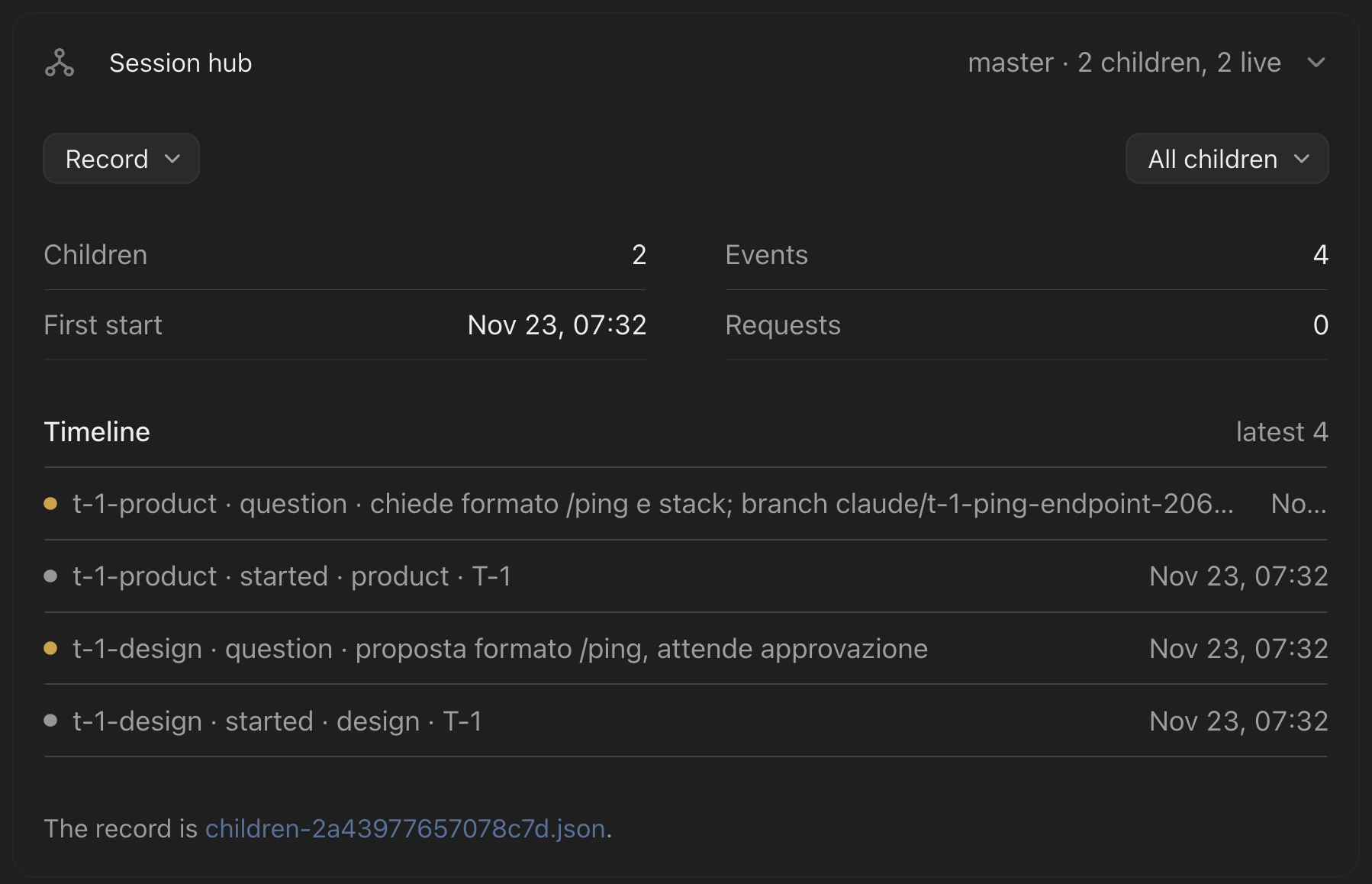
In the Claude desktop app, no panel opens beside the chat: /session-hub replies with a card in the conversation, styled like the app's /context card. The header shows the role and, in the master, how many child sessions exist and how many are active; clicking the title collapses the card down to its header and a bar breaking child sessions down by state. A menu on the left switches views:
- Children (
/session-hub): role, hub, repositories, and record, followed by child sessions grouped by state (running, waiting for you, done, abandoned, lost). Each child shows model and effort in words (Sonnet · medium), what the session list reports, and its last message. Clicking a group name expands it. In a child session, the card shows its master, write root, handoff, and guard status instead. - Record (
/session-hub log): counts of child sessions, events, and requests, when the first one started, and the latest seven events; a menu on the right filters them down to a single child.
Both views read the same record, but answer different questions. Children is the current state: one row per child session, with state, model, effort, and what the active session list says about it. Record is the history: what happened and when, with counts and a timeline of launches, latest messages, and requests with their outcomes, newest first. Children tells you who is working; Record tells you what has happened so far.
The bottom line of the card links to the record file. The most recent card refreshes every 30 seconds; older ones keep their header and bar.
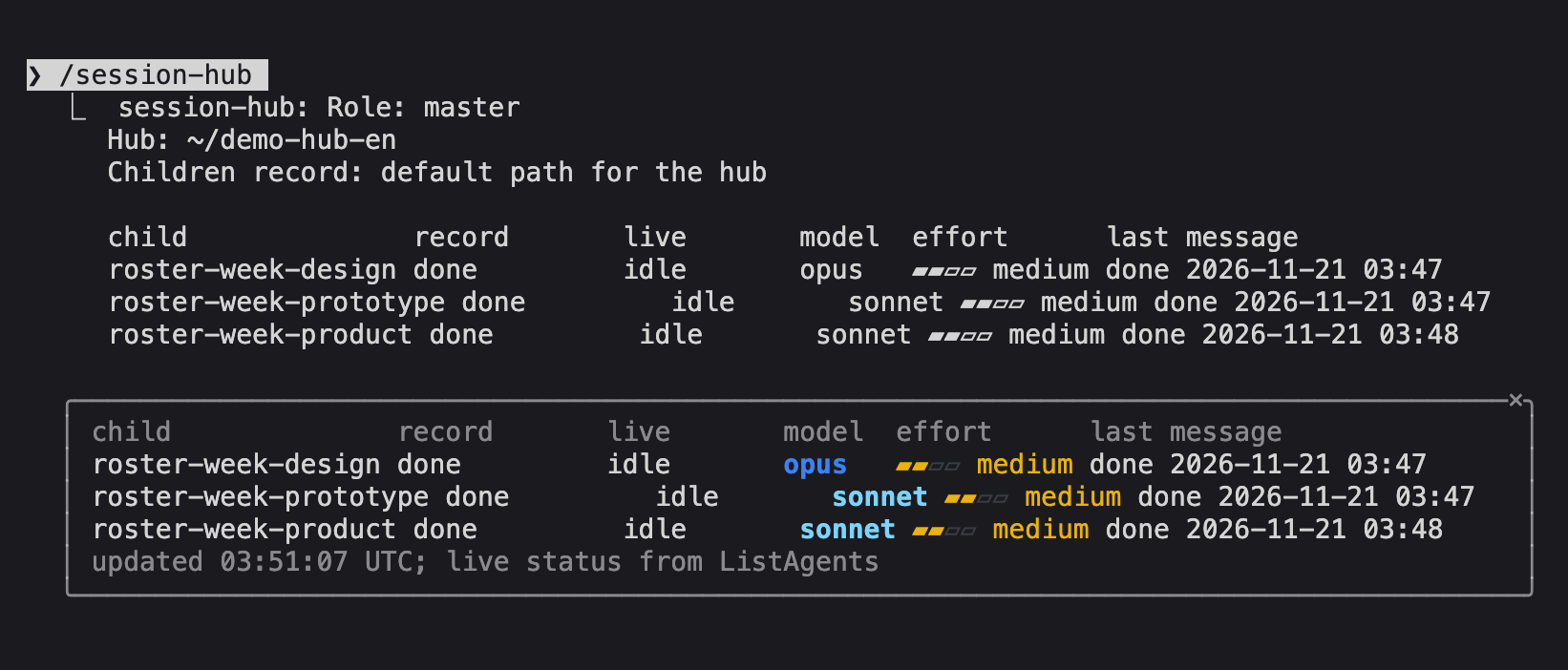
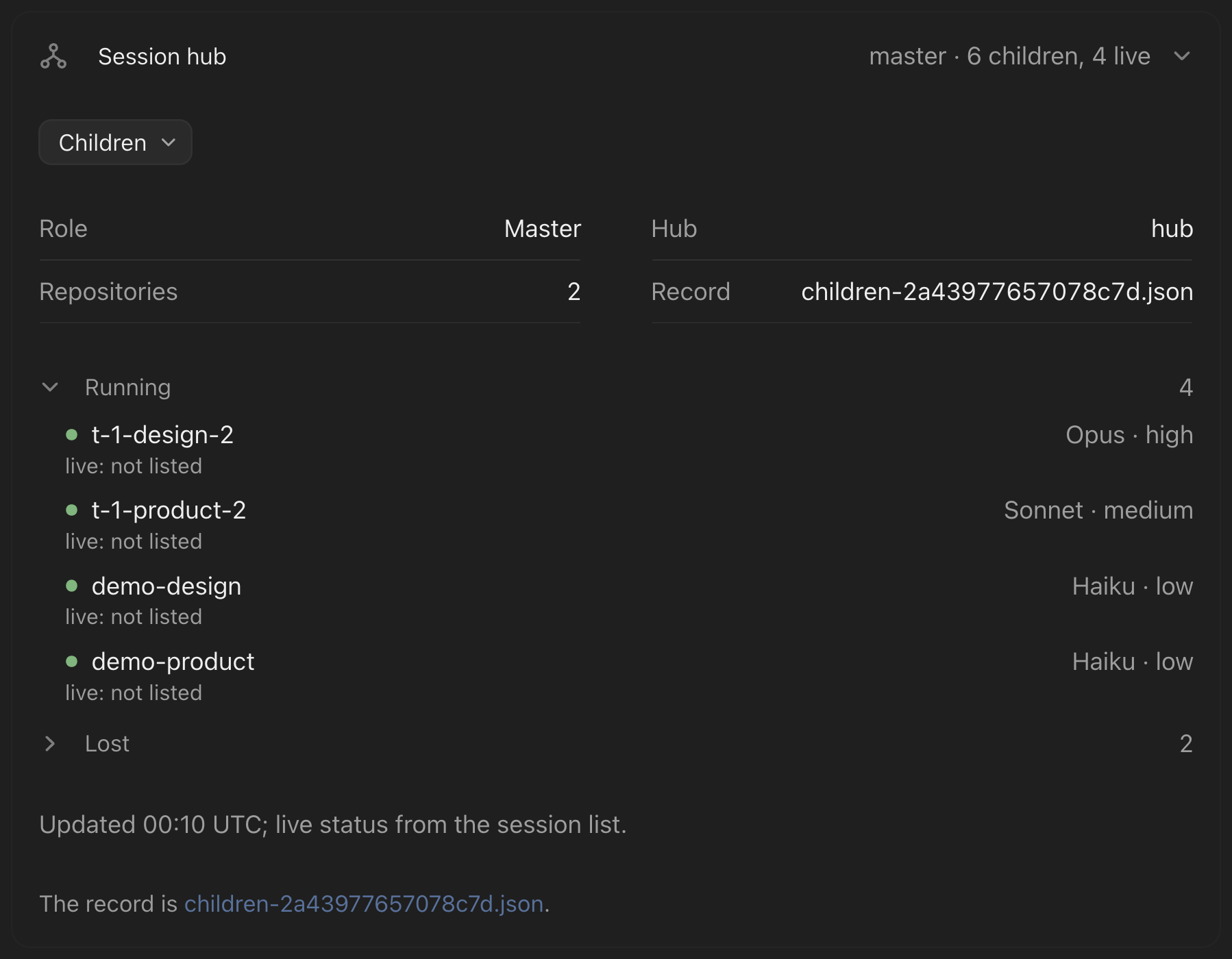
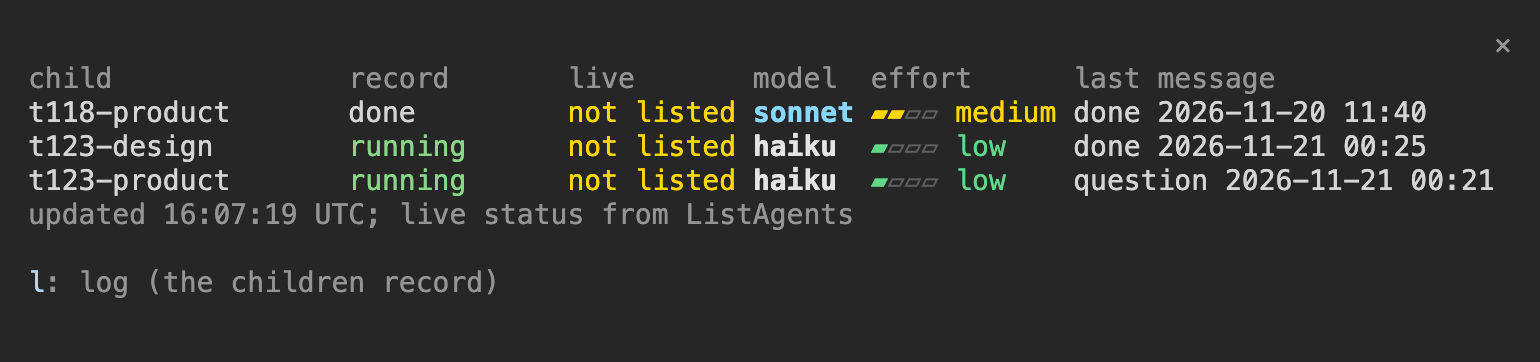
When the master launches child sessions via a Bash command, a line appears under the command for each child, using the same colors: model, effort, and name — for example, ⎿ 🔀 opus ▰▰▰▱ high -> t123-product. The mod reads these from the launch command written by spawn; a command that specifies neither model nor effort gets no line. In the desktop app, the line is plain text: Started t123-product on Opus · high. A child launched with the desktop app's start_session tool gets no line at all: the app's own session card already names it, and nothing added by a mod renders beneath that card.
Here is an example of /session-hub output inside a child session:
Role: child of "hub"
Write root: /w/repo
Handoff: /h/t42.md
Children record: not set
Guards: on (scope guard, shell check, send guard)
/session-hub in child session t123-product. Demo data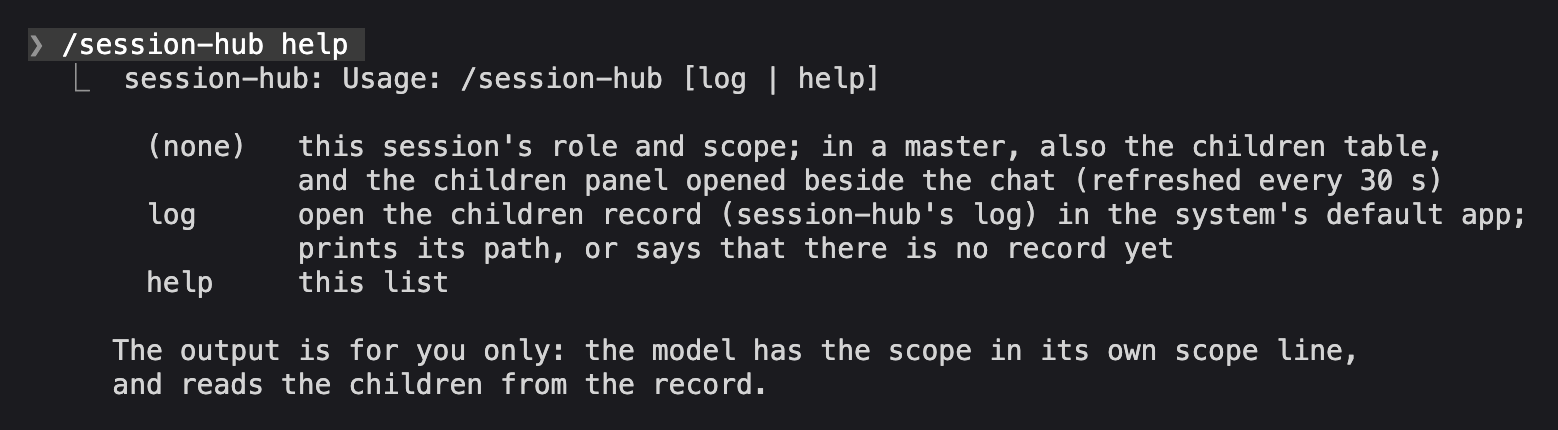
/session-hub help.All data shown by the command, panel, and card comes from the children record maintained by the master.
9. The children record
To track hub state without cluttering any git repository with temporary files, the master stores a single JSON file per hub outside the hub folder itself:
<config dir>/session-hub/children-<hub id>.jsonHere <config dir> is CLAUDE_CONFIG_DIR or ~/.claude, while <hub id> is the first 16 hex digits of the SHA-256 hash of the hub's real path.
- What each entry stores: name, repository, task, scope, model, effort, state, start time, last message, and requests.
- Possible states:
running,waiting-user,done,abandoned, andlost(recorded as active, but no longer present in the session list).
Skills update the file exclusively through scripts/registry.mjs, atomically and under a lock, preventing corruption on concurrent writes. If the file does not contain valid JSON, the issue is reported without ever overwriting it; likewise, a record error never blocks new sessions from starting — spawn warns you and moves on.
You can also inspect the record directly from the terminal:
node "<plugin folder>/scripts/registry.mjs" read --hub /work/hub10. Limitations to keep in mind
Before bringing session-hub into your daily workflow, keep six practical limitations of the current implementation in mind:
- Best-effort, mod-dependent shell check. It works only when mods are enabled; when they are off, shell writes are constrained by the handoff alone.
- No active guards in the desktop app. Its session-launch tool does not accept environment variables, so a child session opened there receives no role variables and relies solely on the handoff.
- The send guard requires active mods. With mods disabled, a child session can technically message a sibling session: the rule to talk only to the master falls back to written instructions.
- Resuming a child session requires its variables. If you run
claude --resumewithout prepending the sameSESSION_HUB_*variables, the session loses its child role. - An externally killed hook lets the write through. The 7-second internal watchdog protects against a slow check, not against a hook forcefully terminated from outside.
- Trust is per repository. Running
claude --bgin a repository nested inside an already trusted hub fails withWorkspace not trusteduntil you open that repository at least once to confirm trust.
To see how these components fit together and trace the guards' full decision flow step by step, continue to the Architecture page.