In plain terms
When Claude Code delegates part of the work to a subagent, it spins up a helper with a clean context that handles a single task and reports back. Left to itself, though, the main agent launches every helper with its own model and its own effort level — how long the model thinks before answering.
That wastes resources in both directions:
- burning a large, expensive model on a basic file search that a fast model would finish in seconds;
- handing a delicate review to a model that's too light, getting a sloppy answer back, and having to redo the work.
model-router as a dispatch desk: the grid picks model and effort for each task handed to a helper, a fast judge steps in only when no model was specified, the helper runs, and the outcome is measured.model-router tackles this with three complementary mechanisms:
- The grid: a short written ruleset that lets the agent make a principled choice before launching a helper and state why.
- The judge: a fast classifier that catches helpers launched without an explicit model and assigns one on the fly.
- Measurement: a local tracker that records, for every task class and model-plus-effort pair, how often work succeeds on the first try — first-pass yield — and what a good result actually costs.

Let's look at how the plugin's two layers put this flow into practice.
How it works
model-router splits selection rules and automatic routing into two independent layers — the first works well on its own.
- The skill (
model-router:choose-model): loads whenever the agent is about to launch a subagent, a child session, or a workflow, and exposes the grid. The agent decides before launching, passesmodelandeffortexplicitly, tags the description with the task class, and prints a one-line explanation for the choice. Works even when mods are disabled. - The mod (
model-router): steps in when a subagent starts without a model specified, queries the judge, and applies both model and effort. It also shows the assigned values beneath everyAgentcall, logs decisions and outcomes locally, and enables the/model-routercommand. Requires mods enabled and Claude Code2.1.329or later.
The router never overrides an explicit choice: it only steps in when no model is set, and it always honors the model and effort declared in an agent's definition.
| Launch | Router behavior |
|---|---|
| Already specifies a model, or is a fork or resume | Keeps it |
| Targets an agent whose definition pins a model, a plugin agent, or an agent with an unreadable definition | Keeps it |
Names an agent whose definition pins the effort (effort: in the frontmatter) | Keeps that effort, even on risky work; if the definition does not pin a model, picks only the model |
Runs with routing disabled or with a session-wide subagent model pinned (CLAUDE_CODE_SUBAGENT_MODEL) | Keeps it |
| Specifies no model | Queries the judge, then sets model and effort |
One important architectural detail: the launch call itself is never altered. The model is applied when the subagent starts, and effort is applied on each of its model requests. Because of this, routing works in every permission mode, including auto mode. Among built-in subagent types, only general-purpose and Explore are routed.
Next, let's look at the criteria behind the grid.
The grid: how choices are made
To keep documentation, setup, and runtime behavior from drifting apart over time, the grid has a single machine-readable source of truth: grid.json. The skill presents it in prose, the setup skill lists its valid values, and an automated test fails if the three ever diverge.
On every launch, the first rule in priority order that produces a value wins:
- Your explicit choice in the conversation.
- The project's
## Model routingsection, if it names that kind of work or task class. - The grid.
The exception is an agent definition that pins its own model or effort: whatever the project section or the grid says, those values stick unless you specify others yourself. Only what the definition leaves unpinned gets passed in: the agent reads the frontmatter of project or user agents and, if it cannot check it—as with a plugin agent—passes neither model nor effort.
Model tiers
Scan down the table from top to bottom and stop at the first row that fits the task:
| Tier | Fits when | Examples |
|---|---|---|
haiku | Simple, repetitive work that is easy to verify and requires no judgment calls | Listing or summarizing files; running a single command; renaming a symbol |
sonnet | The expected outcome can be stated clearly in one sentence | A well-specified change across a few files; tests for existing code |
fable | Broad and open-ended work where judgment and precision truly matter (both must hold) | A complex design; an architectural decision with long-term consequences |
opus | Everything else, and whenever you're torn between two tiers | A review; debugging when the cause is unknown; most coordination work |
Tier names are aliases — the concrete model behind each one depends on your setup. From cheapest to most expensive: haiku < sonnet < opus < fable.
Effort
Answer these four questions in order and stop at the first yes:
- Is it a simple task or a quick back-and-forth? →
low - Is it long, hard, and critical, and running unsupervised? (All three must hold) →
xhigh - Would a missed mistake cost money, a customer, or a bad decision? →
high - None of the above →
medium
The max level is never chosen.
Task classes
Every task falls into one of six fixed task classes, each paired with a usual choice:
| Class | Covers | Usual choice |
|---|---|---|
read-search | Finding files, symbols, or information | haiku · low |
read-analyze | Reading and drawing conclusions: explaining, comparing, summarizing | sonnet · medium |
edit-mechanical | Repetitive edits that are easy to verify | haiku · low |
edit-specified | An edit whose end state fits in one sentence | sonnet · medium |
review-debug | Reviewing, or debugging when the cause is unknown | opus · medium |
design-open | Open-ended design where judgment matters | fable · high |
Put the task class at the start of the subagent description, such as [mr:read-search], or [mr:edit-specified!] when the launch is risky. That tag is what lets statistics classify each task.
Rules around the grid
Six practical rules round out the tables:
- When in doubt, go up a tier. Handing work to a model that's too small costs more in rework than it saves.
- Risk lives in the action, not the topic. Touching production, moving money, or altering unrecoverable data is risky; writing or testing code about those topics is not. A risky launch gets at least
higheffort and the!marker. - Sessions: pick up front. Never change a session's model once it has started.
- Escalate one step at a time. Retry first with sharper instructions; then bump effort up one notch; finally launch at the next tier up with a handoff.
- The coordinator's model. A session that delegates most of the work runs on
opusatmediumeffort, unless its own design work is complex. - Do it directly or delegate; continue, don't restart. Handle a small task on files already in context right in the current session; send a follow-up on the same topic back to the subagent you already started.
Before every launch, the agent states its choice on a single line — the 🔀 symbol, model, four-bar effort meter, effort level, and a reason in under twelve words:
🔀 opus ▰▰▰▱ high -> review with unknown cause, going up
🔀 haiku ▰▱▱▱ low -> mechanical rename, easy to check
With the mod enabled, the same line appears in color beneath every Agent call, showing what the subagent actually got and why (explicit, fixed, judge: <class>; lowered from opus / raised from / kept, judge: risky work; raised from <tier>, or keep: <why>). In the Claude desktop app, it renders as a clean plain-text line in the app's native colors: Routed to Haiku · low followed by the reason.
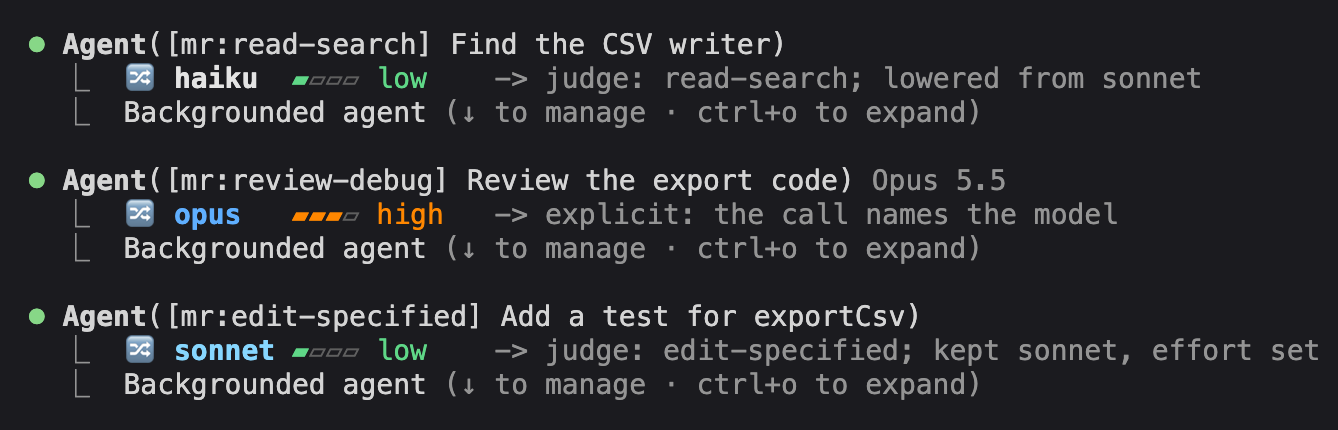
low to red for xhigh; reason dimmed. Demo data
So far we've covered choices made up front. What happens when a subagent launches with no model specified at all? That's where the judge comes in.
How the judge works
When a model-less launch arrives and doesn't match any of the keep-as-is cases, it needs quick classification before the subagent starts working. That job belongs to the judge, an internal classifier inside the mod that you never call directly.
grid.json, the task wrapped as data, a call to the fast tier with time and token caps, a JSON response, and thresholds deciding what to change.What it receives and how the prompt is built
The judge receives the subagent type, its short description, and the first 4,000 characters of the task. To guard against prompt injection, the task text is wrapped as data, any internal closing tags are escaped, and the judge is explicitly instructed not to follow instructions found inside the text.
The system prompt is generated directly from grid.json: it includes the three tiers handled by the judge (fast, balanced, deep), the four effort questions numbered 0 through 3, the six task classes, and the rule that risk depends on the action. If you edit the grid, the judge's prompt updates automatically.
The call and the response
The router makes a single call to the fast tier (the fastModel option, which defaults to haiku) at low effort, with a 300-token output cap and an 8-second timeout (timeoutMs). The call runs through your session's client like a regular subagent and counts toward your session cost.
The judge returns a single JSON object:
{ "tier": "fast | balanced | frontier | deep", "confidence": 0.0, "effort": 0, "effort_confidence": 0.0, "risky": 0.0, "class": "<class>" }How the router decides
Aiming too low ruins the output; aiming too high just costs a bit more. Because of that, decision thresholds are asymmetric:
| Rule | Default | Why |
|---|---|---|
Lowering the model requires confidence ≥ | 0.6 | Getting it wrong starves the task |
Raising the model requires confidence ≥ | 0.3 | Getting it wrong only costs money |
risky above threshold, or ! tag | 0.7 | Forces the deep tier and at least high effort, bypassing both thresholds |
Missing confidence | — | Never changes the model in either direction |
Comparison is always relative to the parent session's model. Effort likewise changes only when effort_confidence clears the threshold (the downgrade threshold for low, the upgrade threshold for higher levels). If the call already carries an explicit effort, that value is kept, and max is never set. Finally, the frontier tier (fable) is only allowed for design-open with a confidence of at least 0.7 (minFrontierConfidence); otherwise the response counts as deep (opus). Risky work always goes to deep.
When it fails
On error, the router fails open. A judge failure, timeout, or unreadable response leaves the launch untouched and logs an error — except when a launch is marked with !, which still gets bumped to deep. Every decision is logged with its action: downgrade, upgrade, keep, explicit, forced-risk, or error.
The defaults work well in most cases, though every repository has its own exceptions — here is how to configure them.
Configuration
You can customize model-router at two distinct levels: per-project exceptions and global plugin options.
Project exceptions: the Model routing section
The grid stays the same everywhere; anything specific to a repository belongs in the ## Model routing section of the project's AGENTS.md (or CLAUDE.md).
To create or update it, ask to "set up model routing for this project" or state the rule you want right away (for example, "always use opus for migrations"). model-router:setup locates your instructions file, asks about defaults and exceptions, suggests a few after scanning the repository, shows you the exact block, and writes it only after you explicitly confirm — without committing.
## Model routing

Defaults for `model-router:choose-model`. An explicit choice in the conversation still wins; anything not
listed here follows the grid.

- Default: the grid
- Coordinator: `opus` · `medium`

| Kind of work | Class | Model | Effort | Why |
|---|---|---|---|---|
| Database migrations | `edit-specified` | `opus` | `high` | data cannot be restored |
| Bulk renames across the codebase | `edit-mechanical` | `haiku` | `low` | checked by the compiler |
Every value must stay within the grid's vocabulary: models haiku, sonnet, fable, opus; effort from low to xhigh; and the six task classes. If you specify an out-of-range value, setup flags it and suggests the closest valid match.
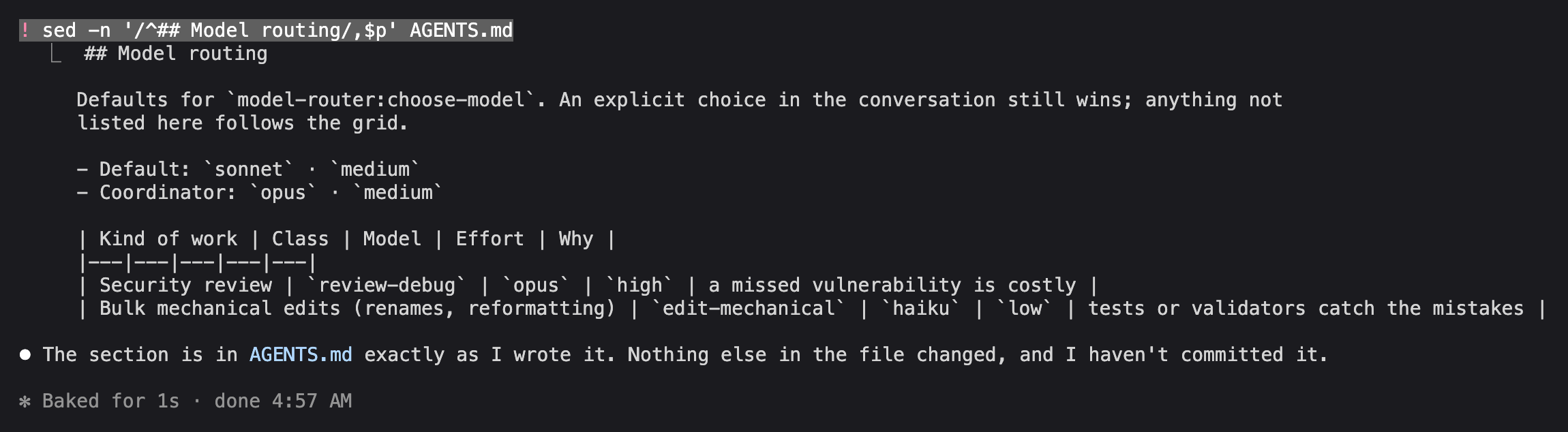
## Model routing section alongside the plugin options.Plugin options
Set global options via /config or under pluginConfigs in a settings file, keyed by the installed plugin name:
{
  "pluginConfigs": {
    "model-router@mrbogomips": {
      "options": { "reworkWindowMin": 45, "deepModel": "opus" }
    }
  }
}| Option | Default | Meaning |
|---|---|---|
fastModel, balancedModel, frontierModel, deepModel | haiku, sonnet, fable, opus | Models mapped to the judge's fast, balanced, frontier, and deep tiers; fastModel also runs the judge itself |
minDowngradeConfidence | 0.6 | Confidence required to lower the model or set low effort |
minUpgradeConfidence | 0.3 | Confidence required to raise the model or set medium, high, or xhigh effort |
minFrontierConfidence | 0.7 | Confidence required to send a design-open task to the frontier tier; below this, or for any other class, the spawn gets deep |
riskThreshold | 0.7 | Risk score above which a launch gets the deep tier and at least high effort |
timeoutMs | 8,000 | Maximum wait time for the judge; once exceeded, the launch stays unchanged |
routeSubagents | true | Turns subagent launch routing on or off altogether |
measure | true | Records the event log and quality data |
adapt | false | Picks based on quality data (not used yet) |
halfLifeDays | 30 | Half-life for quality data decay, in days |
projectPriorStrength | 5 | How many observations the user level counts for when estimating a project (not yet used) |
exploreCap | 0.1 | Maximum share of decisions per class that can explore alternatives (not yet used) |
reworkWindowMin | 30 | Minutes after a report within which redoing the work counts as rework |
similarityThreshold | 0.5 | Word overlap above which two descriptions count as the same task |
To turn routing off for the current session only, run /model-router off (and on to turn it back on); to disable it permanently, set routeSubagents to false.
Once routing is live, the real question is whether those choices are paying off on your actual work. Here is how model-router turns session events into statistics.
How statistics are collected
Measuring subagent quality without polling a second model takes objective signals drawn from everyday work. model-router collects those signals locally and scores each task only once it has enough evidence to judge how it turned out.
1. Events
The mod appends records to events.jsonl inside your Claude Code config directory, never calling external models for measurement. Each line logs one of these events:
decision: every routing decision;spawn: every subagent launch, with type, name, and short description;signal: files written by the session and subagents, failed tool calls, the next two prompts you type right after a subagent reports back, interrupts, and resumes;report: each subagent's report, complete with token counts and estimated cost;session-end: when the session closes.
2. Tasks and outcomes
Every subagent launch maps to a task. Its outcome is locked in once the rework window closes — 30 minutes after the subagent reports back, or at the end of the session if that comes first.
| Outcome | When it is assigned |
|---|---|
success | The subagent delivered its report and nothing inside the window redid its work |
rework | Within the window, the main session or another agent rewrote one of its files; or a similar launch of the same class followed on the same files; or the same subagent was sent a correction after reporting; or one of the next two prompts you typed named its files or its task |
failure | The subagent failed, or the parent session stopped it and redid the work |
cancelled | No report arrived (an unresponsive task times out after 24 hours), or the run was interrupted |
Two descriptions count as "similar" when the distinct words they share make up at least half of all their distinct words (similarityThreshold), ignoring common words and the task class tag.
3. Cells, decay, and compaction
Outcomes roll up into task class × tier × effort cells — for example, edit-specified · sonnet · medium — maintained at two levels: user (across all your projects) and project (keyed by git remote, or by root directory if there isn't one).
- Time decay: counts decay with a 30-day half-life (
halfLifeDays), so work from a month ago carries half the weight of work from today. - Excluded from learning: cancelled tasks, risky tasks, tasks without a task class, tasks run on models outside the four families, and tasks with unknown effort are still logged, just excluded from learning.
- Compaction: raw events stay open until their rework window closes. Compaction finalizes expired tasks and updates aggregates at session start, whenever you open or refresh the usage view, and before generating the report. Running it repeatedly is idempotent — no task is ever counted twice.
Each cell tracks four metrics: first-pass yield (FPY), rework rate, cost per task (engine estimate), and cost per successful task. One of those four anchors the entire system — let's see why.
First-pass yield: the number behind every choice
A cheap model that keeps getting things wrong doesn't save money — it makes you pay for the same job twice. First-pass yield (FPY) comes out of manufacturing to measure exactly that: on a production line, it tracks the share of units that come off the line good on the first run, with no rework and no scrap. At 95% FPY, one part in twenty has to be reworked or thrown out — and nobody counts a reworked part as a first-pass success.
model-router applies the same yardstick to subagents: every launch is a unit, and it succeeded on the first pass if nothing had to redo its work over the next half hour.
How it is calculated
For each cell (task class × tier × effort), using time-weighted counts:
FPY = success ÷ (success + rework + failure)
successcounts in favor;reworkandfailurecount against.cancelledtasks are left out of both sides: a task you stopped or one that never finished says nothing about how well the model fit the job.- Because of the 30-day half-life, FPY reflects how models perform on your work today, not months ago.
Why FPY instead of sticker price
Token pricing tells you what it costs to run a task, not what it costs to get a successful one. Work that comes back broken gets paid for again — in the retry, in the main session cleaning it up, and in your own time. FPY converts sticker price into the number that actually matters, cost per successful task:
cost per successful task = cost per task ÷ FPY
Compare two cells on the same kind of work, with twenty closed tasks each:
| Cell | success / rework / failure | FPY | Cost per task | Cost per successful task |
|---|---|---|---|---|
haiku · low | 5 / 12 / 3 | 25% | $0.020 | $0.080 |
sonnet · low | 18 / 2 / 0 | 90% | $0.050 | $0.056 |
haiku costs less than half as much per launch, yet every good result ends up costing more because three out of four tasks come back for rework. Even that table is generous, since it leaves out the parent session's time and your own. The flip side holds too: on a straightforward search, a small model nails it nineteen times out of twenty, so paying for a bigger one buys you nothing.
How to read it
- Color thresholds: in Overview, the FPY tile is 🟢 from 85% up, 🟡 from 70%, and 🔴 below that; the per-tier and per-effort bars use the same scale.
- Rework rate: the flip side of FPY (rework ÷ (success + rework + failure)). Together they add up to 100% minus the failure rate.
- Weak signals (⚪): any cell with fewer than five tasks is marked weak — 100% across two tasks is luck, not statistics.
- Read-only classes:
read-searchandread-analyzeare always marked weak as well. Readers don't write files, so the strongest rework signal (someone rewriting the same files right afterward) never fires, and a poor search tends to look like a success. - Baseline noise: if you edit a file a subagent wrote for reasons unrelated to its task, that edit still registers as rework. Across large numbers the noise evens out; on small samples it doesn't, which is one more reason to treat small cells as hints rather than verdicts.
How the router uses it
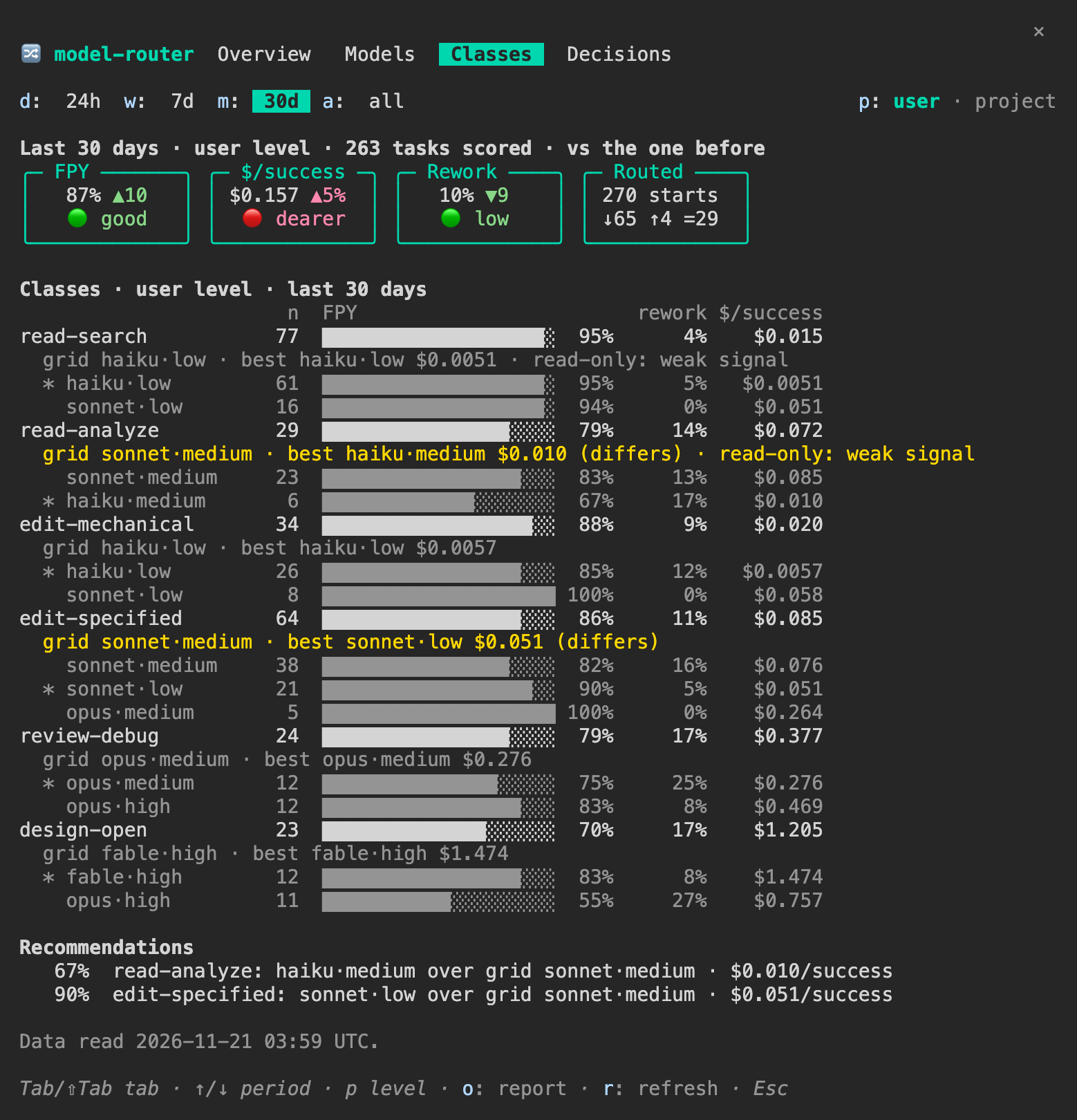
Today (versions 0.2 and 0.3), FPY informs rather than drives. The adapt option is off and the router follows the grid alone. FPY powers the /model-router view, the report, and — for each task class — a recommended cell: the one with the lowest cost per successful task among cells with at least three tasks, never dropping below the grid on review-debug and design-open. If a recommendation consistently diverges from the grid, you can decide to add an exception under ## Model routing.
In a planned future version, FPY will drive the choices. With adapt enabled, the router balances exploitation (using what works) and exploration (trying promising alternatives) via Thompson sampling:
- For every cell, it maintains a range of plausible FPY values modeled as a Beta distribution:
alphagrows with time-weighted successes,betawith weighted reworks and failures. - On each launch, it draws a plausible FPY from each candidate cell neighboring the grid, divides the cell's cost by that draw, and picks the one with the lowest cost per success.
- Cells backed by plenty of data draw values close to their measured FPY (a proven winner keeps winning); sparse cells produce wider draws and get tested every so often, capped at 10% of decisions per class (
exploreCap). - With no history yet, the grid's pick starts ahead (
alpha = 2, beta = 1, an expected FPY of two thirds) compared to neighboring cells (1, 1): the grid wins until the numbers prove otherwise. - A fresh project inherits your user-level history weighted at five tasks (
projectPriorStrength), then gradually shifts to its own data. - Exploration never drops below the grid for
review-debuganddesign-open, never overrides values pinned in## Model routing, and never touches risky launches.
Why it measures first. Versions 0.2 and 0.3 stick to measurement so you can check in /model-router that the signals genuinely match how you work before handing over the wheel to automatic selection.
Now that you know how to read the numbers, here are the five steps to get them showing up on your machine.
Getting statistics to show up
No special configuration is needed, just five conditions in sequence:
2.1.329 or later with mods enabled, work normally, let the rework window close, then open /model-router or the report.- Install
model-routerand run Claude Code2.1.329or later with mods enabled. Only the mod records data — if/model-routercomes back as an unknown command, the mod isn't loaded. - Leave
measureenabled (it's on by default). - Work normally and let subagents run. Only subagent launches become tasks. If you write a launch by hand, include the class tag: an untagged launch that bypasses the judge ends up without a task class and is excluded from learning.
- Wait for the rework window to close (30 minutes after the subagent reports back, or at session end).
- Open
/model-routeror ask for the model-router report. Opening the view runs compaction for up to 3 seconds; pressrto refresh.
Once your first tasks close, you can browse the numbers in the terminal, in the Claude desktop app, or in your browser.
The usage view and the report
Checking metrics doesn't clutter the conversation or burn context: everything /model-router displays is visible only to you, and the model never reads it. Its shape adapts to where you work: in the terminal it opens an interactive view styled like Claude Code's settings; in the Claude desktop app it drops a card into the conversation, styled just like the app's built-in /stats and /context cards.
| Command | What it does |
|---|---|
/model-router | Opens the usage view — or the card in the desktop app — on Overview, last 7 days, all projects |
/model-router [overview|models|classes|decisions|savings] [24h|7d|30d|all] [user|project] | Opens directly on the specified view, time window, and level, in any order |
/model-router on, off | Turns routing on or off for the current session |
/model-router report | In the terminal, builds the HTML report page, opens it in your default browser, and prints its path; in the desktop app, opens the card on the Trend view |
/model-router log | In the terminal, opens the event log (events.jsonl) in your system's default app and prints its path; in the desktop app, opens the card on the Log view |
/model-router help | Lists arguments and keyboard shortcuts |
In the terminal
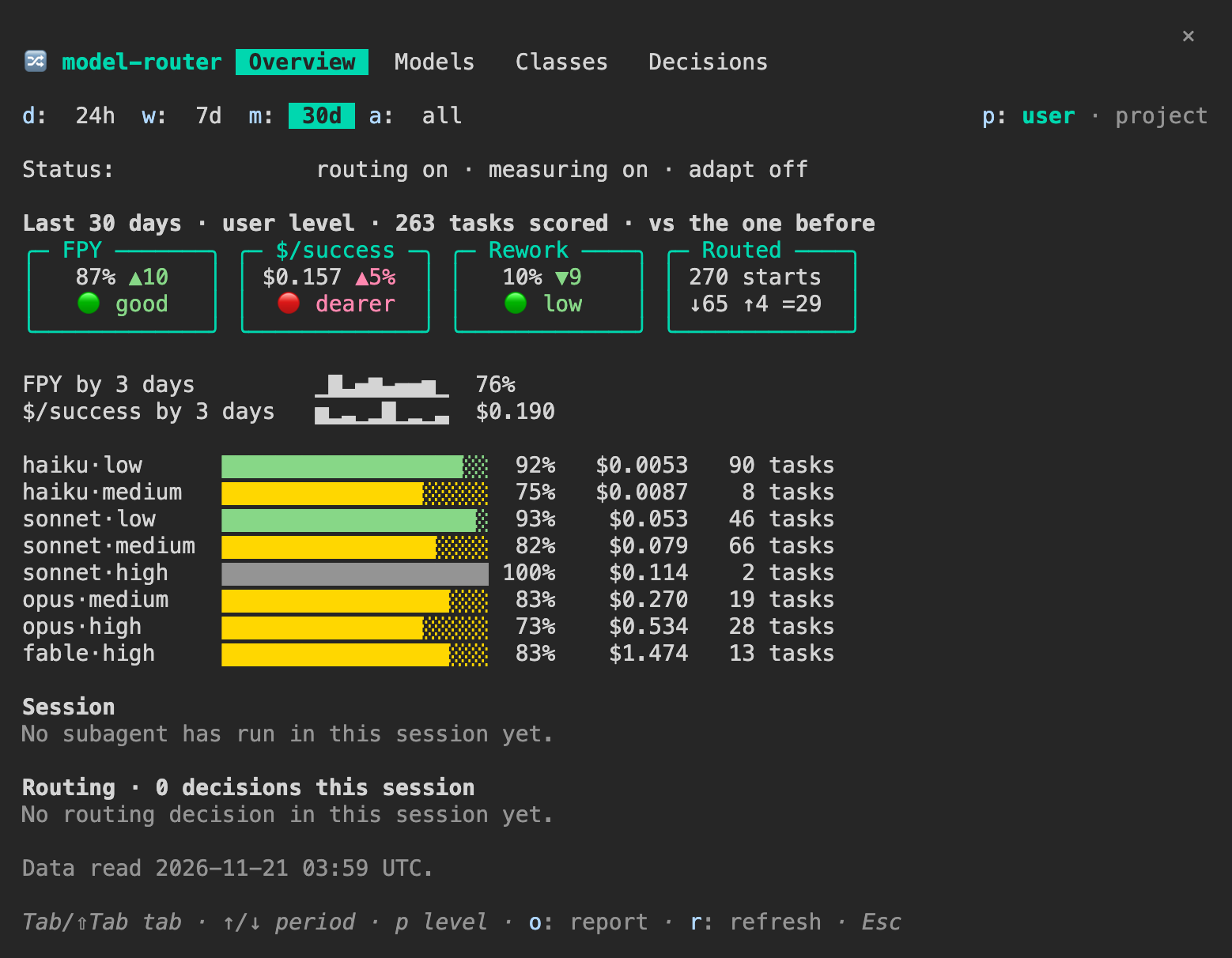
The view has four tabs, a time window (24h, 7d, 30d, all), and an observation level (user or project). The Overview tab leads with four summary tiles:
- FPY: 🟢 from 85%, 🟡 from 70%, 🔴 below;
- Cost per success: 🟢 cheaper or 🔴 pricier than the previous window;
- Rework: 🟢 up to 10%, 🟡 up to 25%, 🔴 above;
- Routed launches:
↓downgrades,↑upgrades,=kept.
Any tile backed by fewer than five tasks displays ⚪ weak — too little data to draw conclusions.
Keyboard shortcuts work as soon as the view opens: Tab and Shift+Tab switch tabs, ↓ and ↑ cycle through time windows, d w m a jump straight to one, p toggles between user and project level, o opens the report, l opens the event log, r refreshes, and Esc closes.
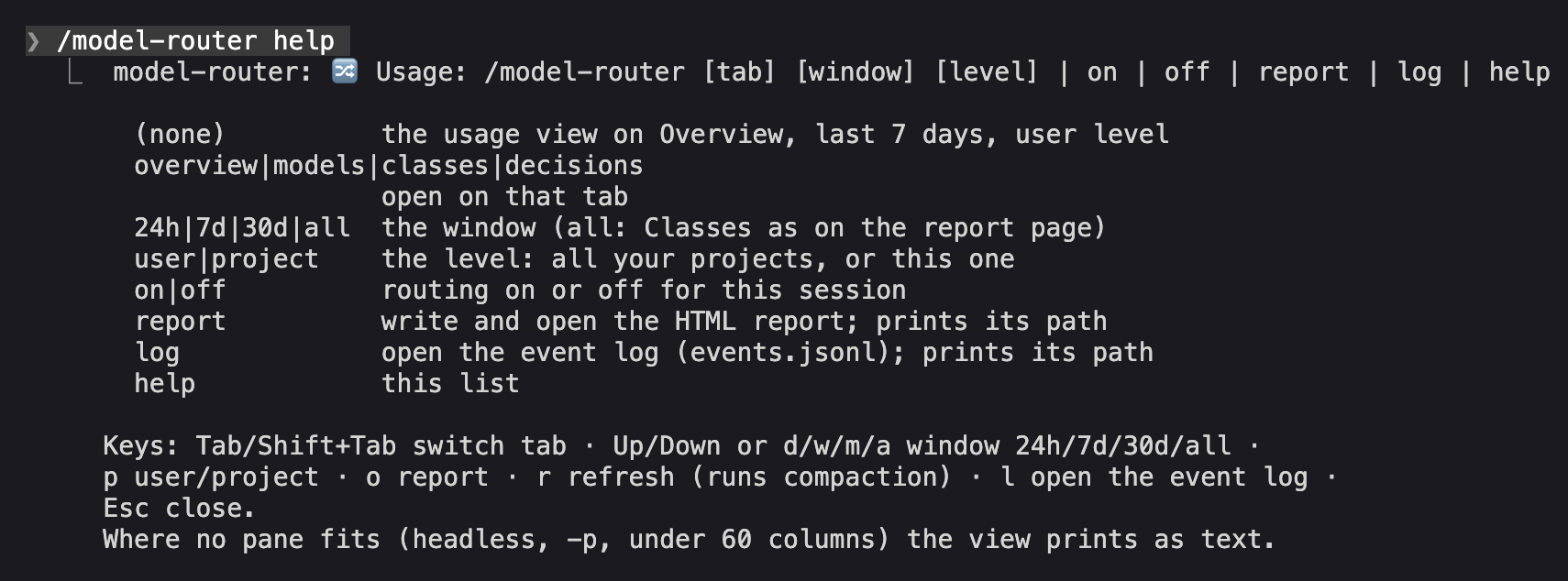
/model-router help.In the desktop app
No panel opens next to the chat and no browser page pops up uninvited: everything lives inside a single card that follows the app's light and dark themes. The header shows first-pass yield and cost per success for the selected window; clicking the title collapses the card down to just the header and a bar splitting tasks by model. On the left, a menu switches views; on the right, two menus pick the range (all projects or this one) and the time window.
- Overview: a 22-week daily task heatmap, headline figures, routing decisions by type, and a one-line comparison against the prior period.
- Models: one row per model, shaded from dark blue for Opus to light blue for Haiku, showing its share of tasks; underneath, first-pass yield, cost per success, and task counts and outcomes broken down by effort level. Below that sits a daily task chart split by model.
- Task classes and Projects: one row per task class or project, with the same metrics.
- Decisions: router decisions grouped by type (moved to a cheaper model, moved to a stronger one, kept, or passed explicitly in the call); clicking a type shows its latest entries.
- Savings: tells you whether routing pays off. It compares subagent costs against what the same tasks would have cost on the model of the session that started them: a one-sentence verdict, cost per success and savings, the share of tasks moved to a cheaper model along with their outcomes, weekly spend, and savings by model pair. The verdict requires at least 100 compared tasks. The same view appears as a terminal tab and as the first section of the report page.
- Trend: weekly first-pass yield and cost per success rendered as bar charts. The bottom row links to the HTML report page.
- Log: event log records broken down by type and over time, along with the latest entries for each type; the bottom row links to
events.jsonl. Prompt text is never shown.
Only the newest card updates live as subagents turn in their reports; older cards retain their header and bar.
The same views across both environments
Overview, Models, Decisions, and the report, side by side in the terminal and the desktop app:
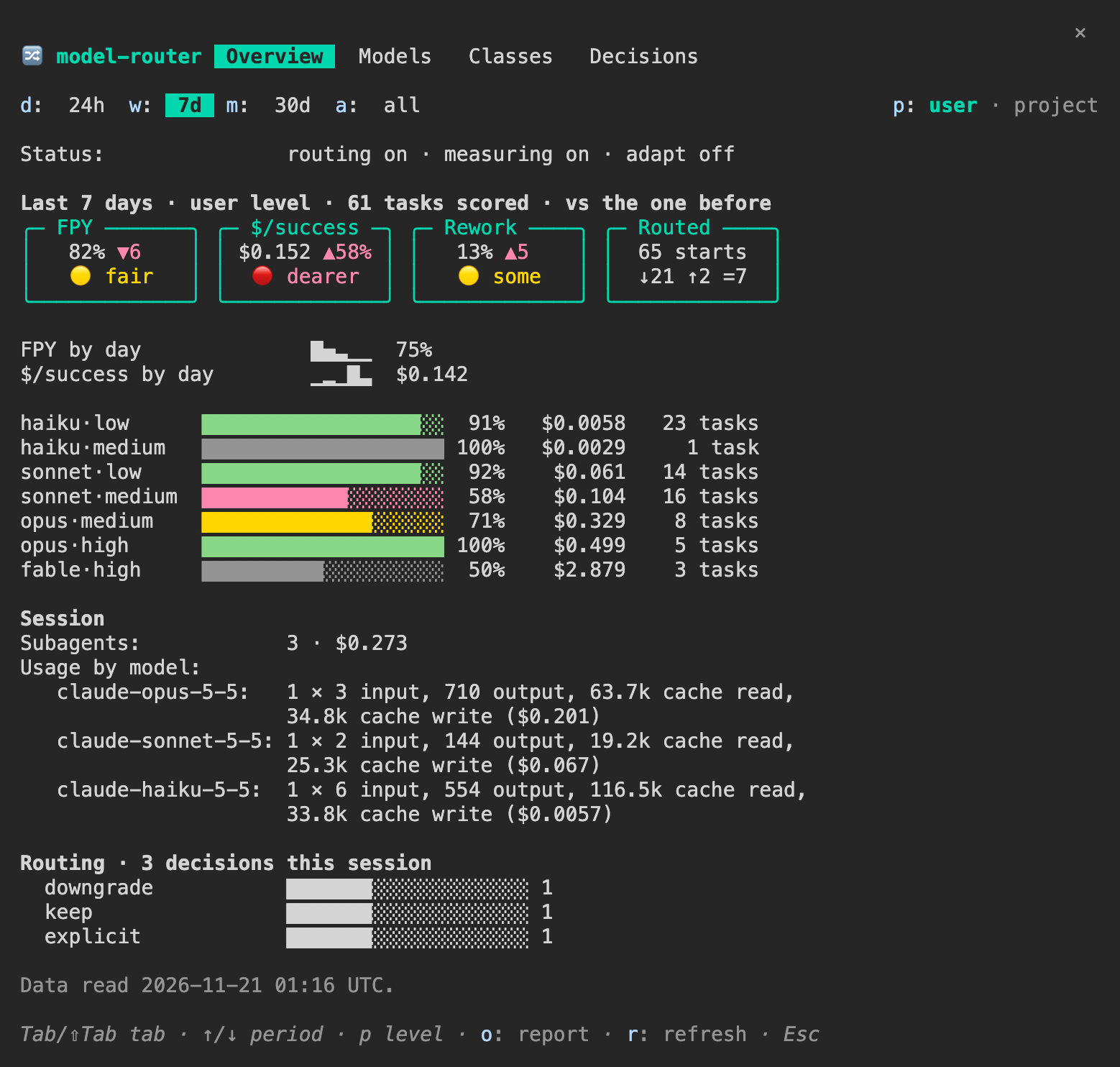
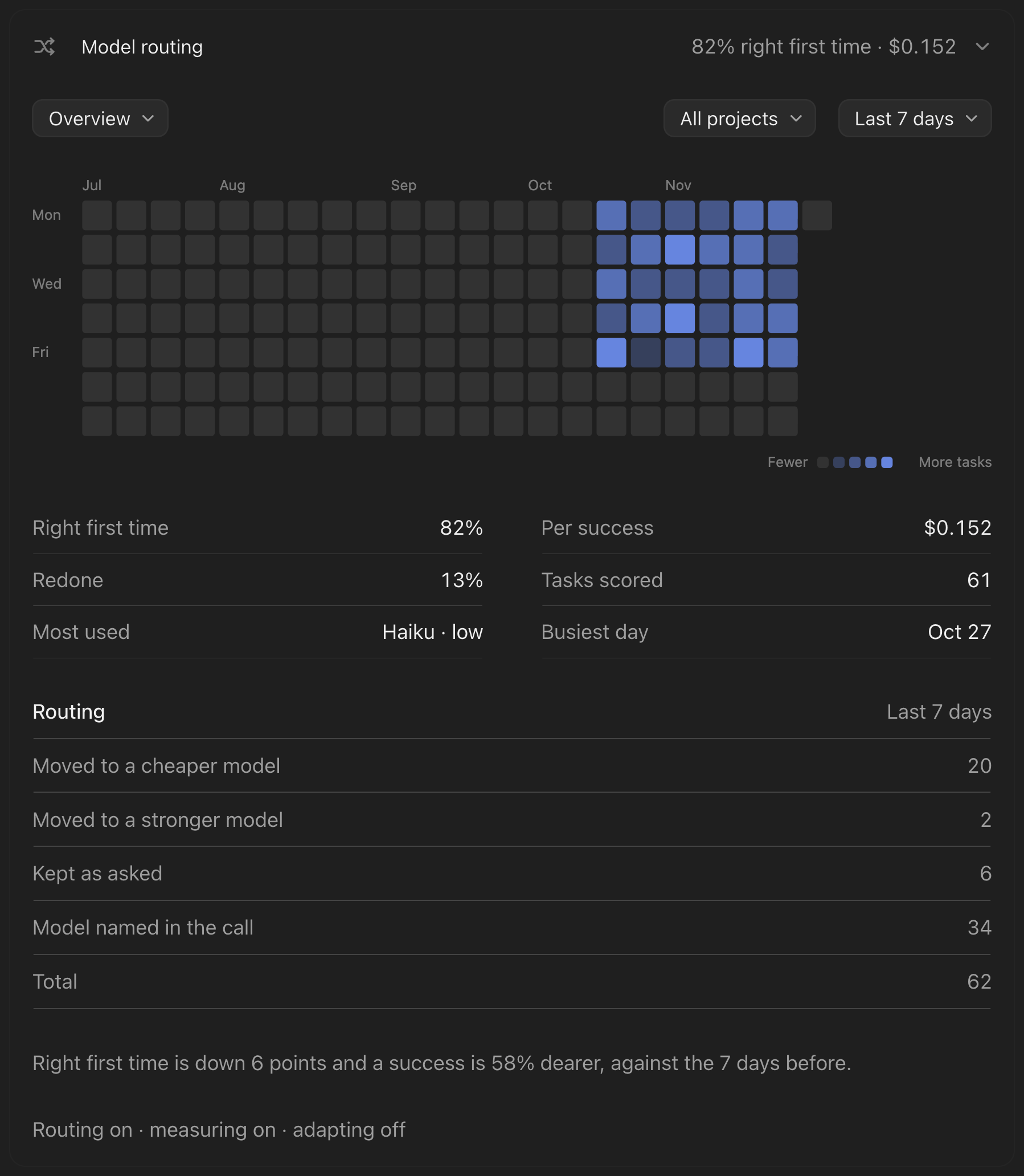
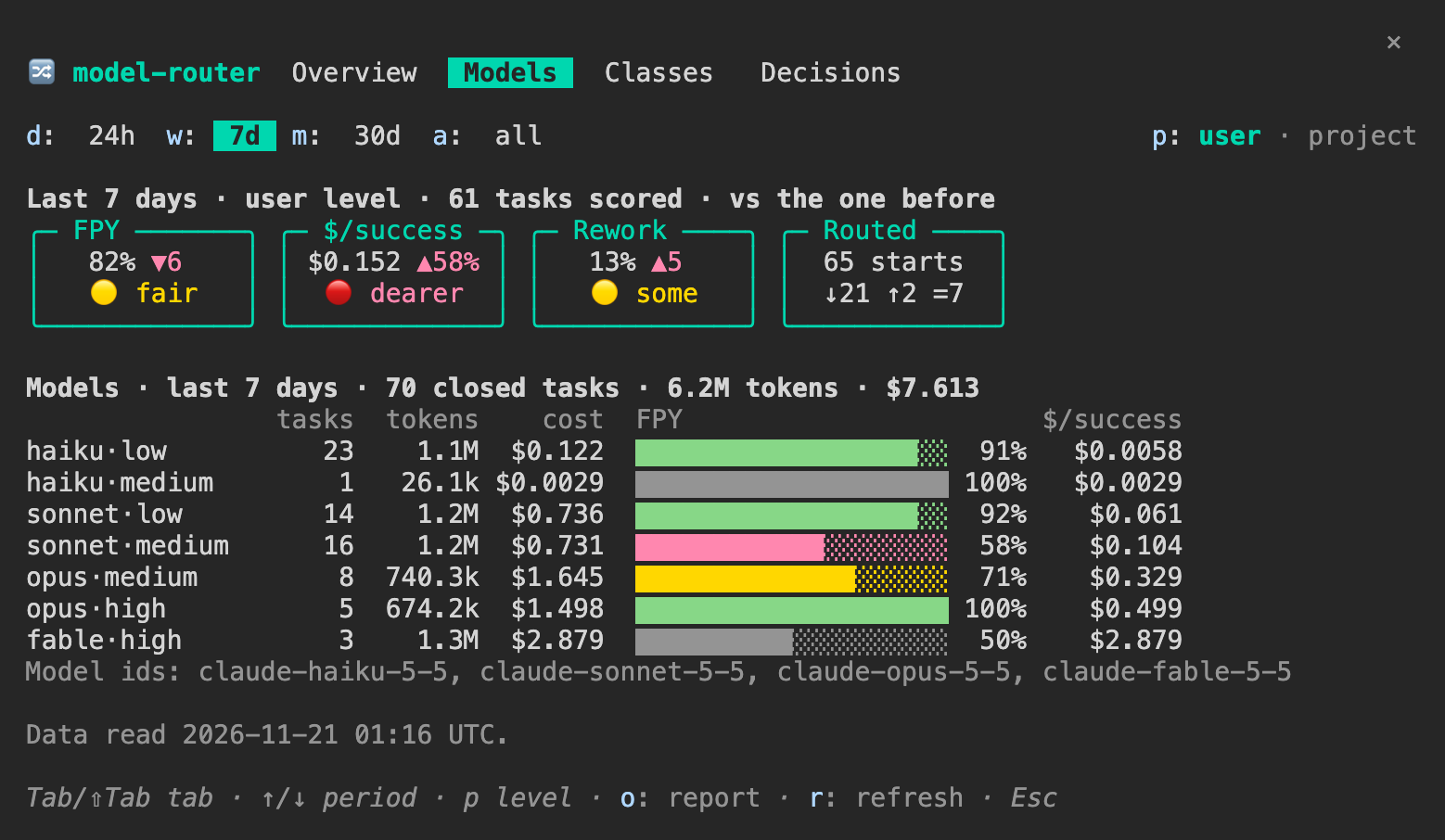
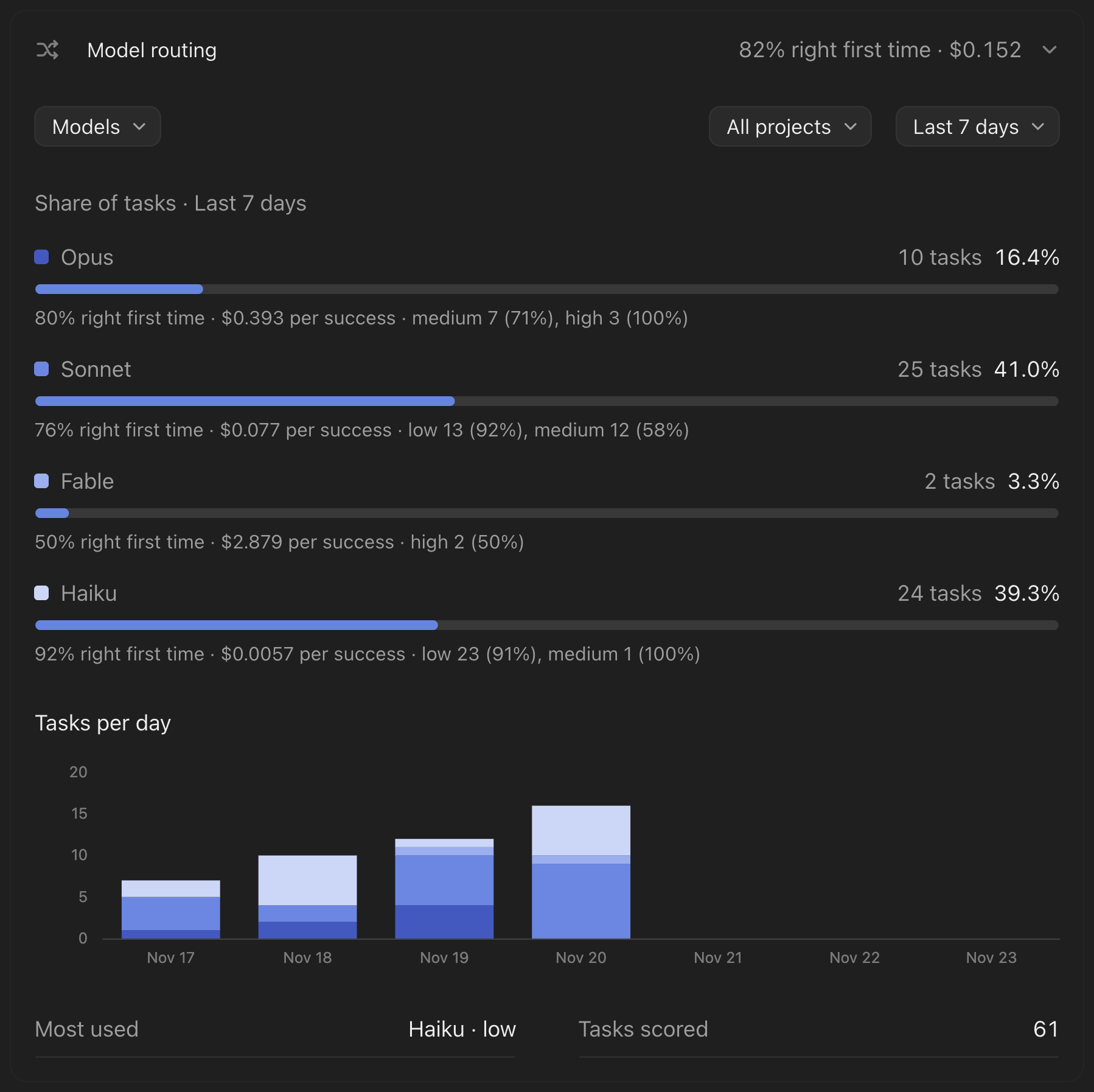
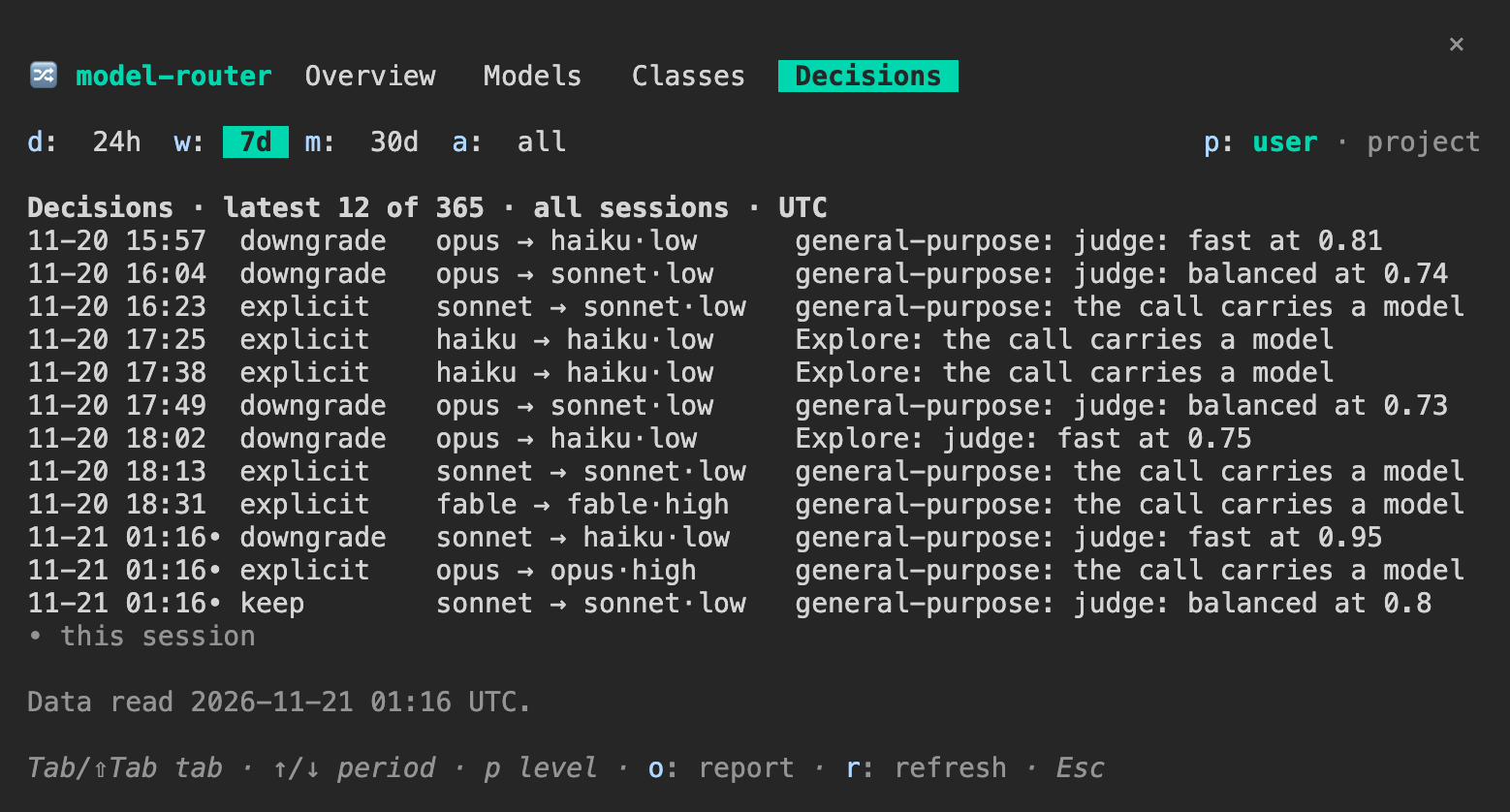
• marks ones from the current session. Demo data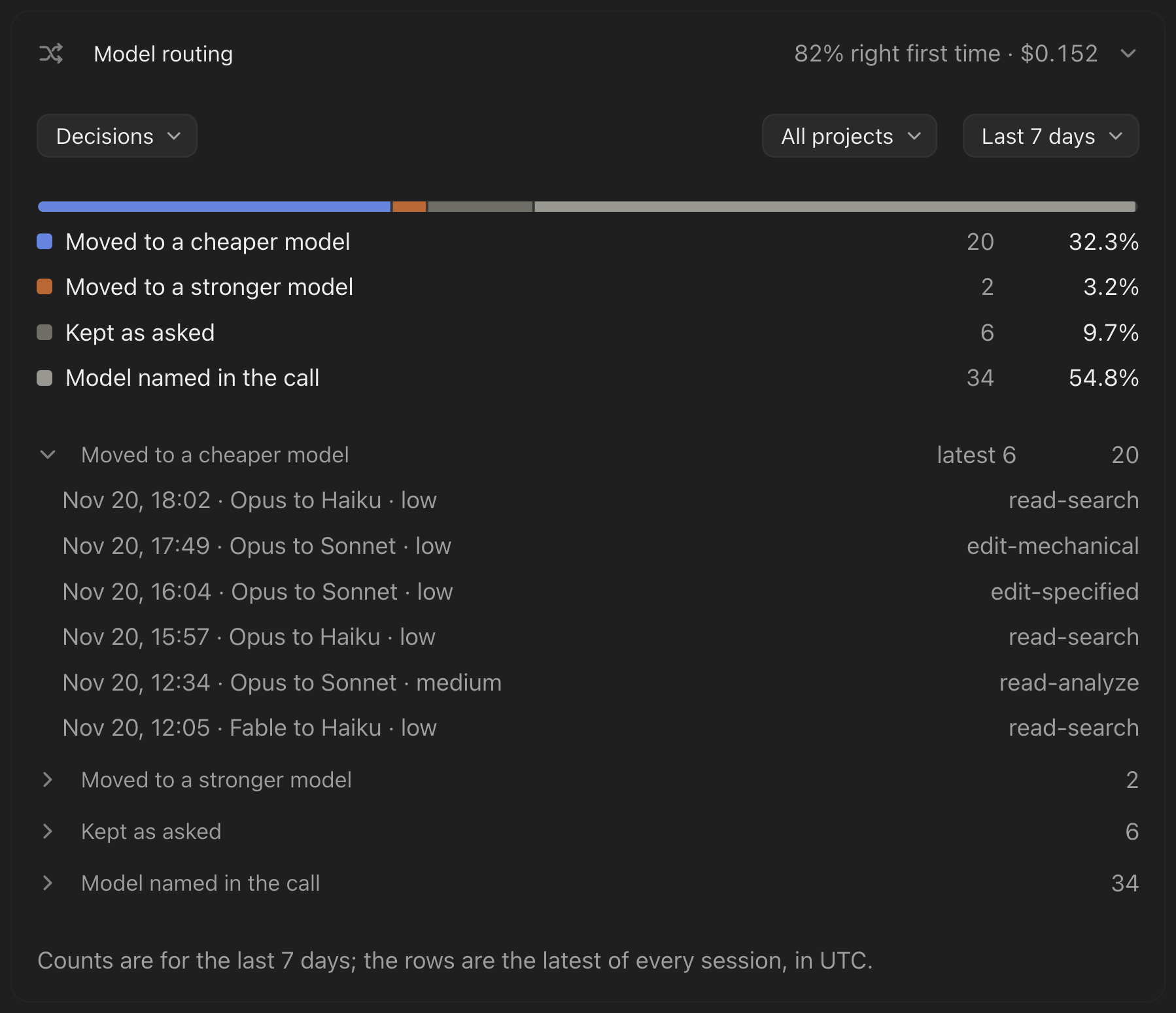
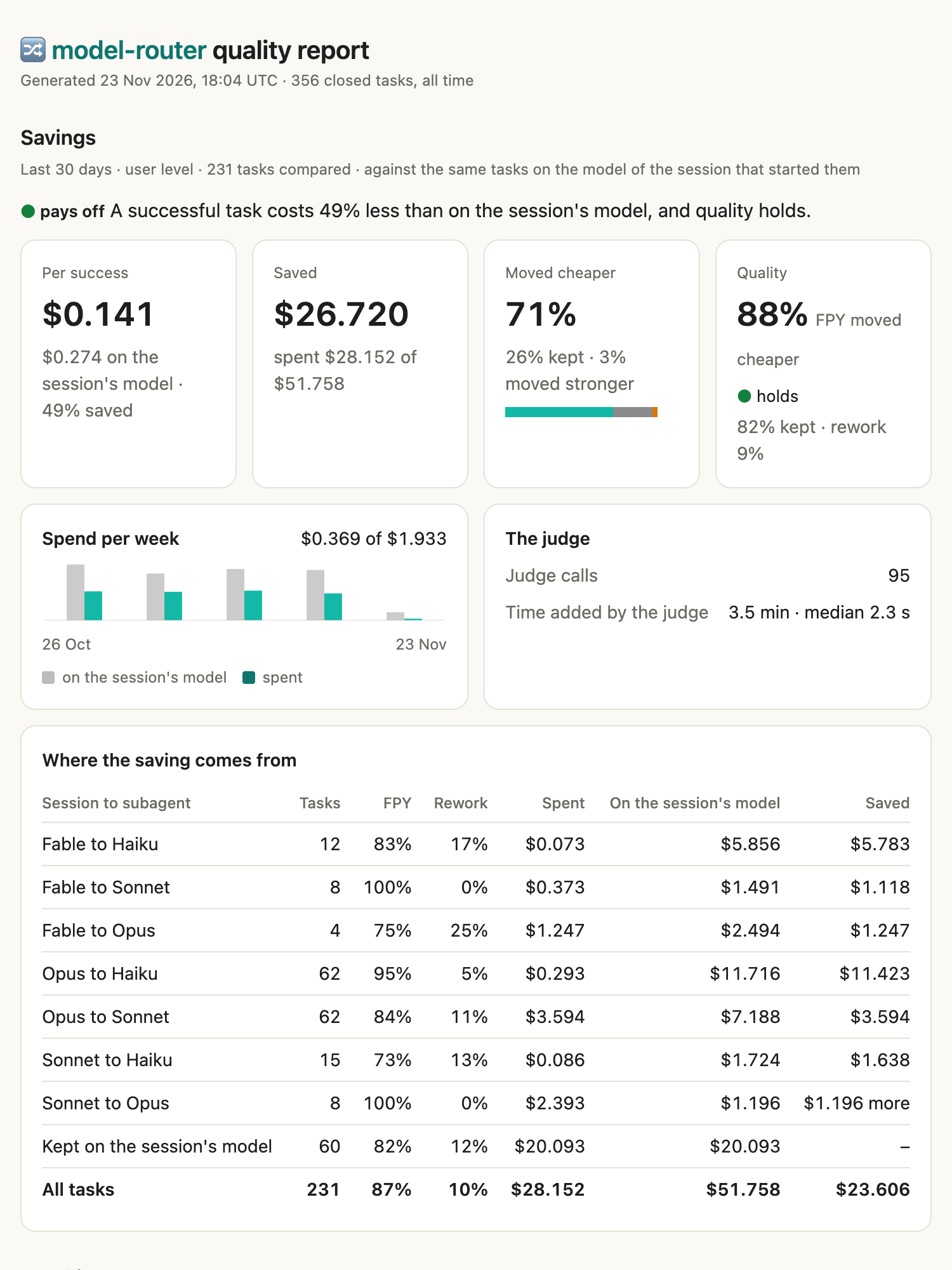
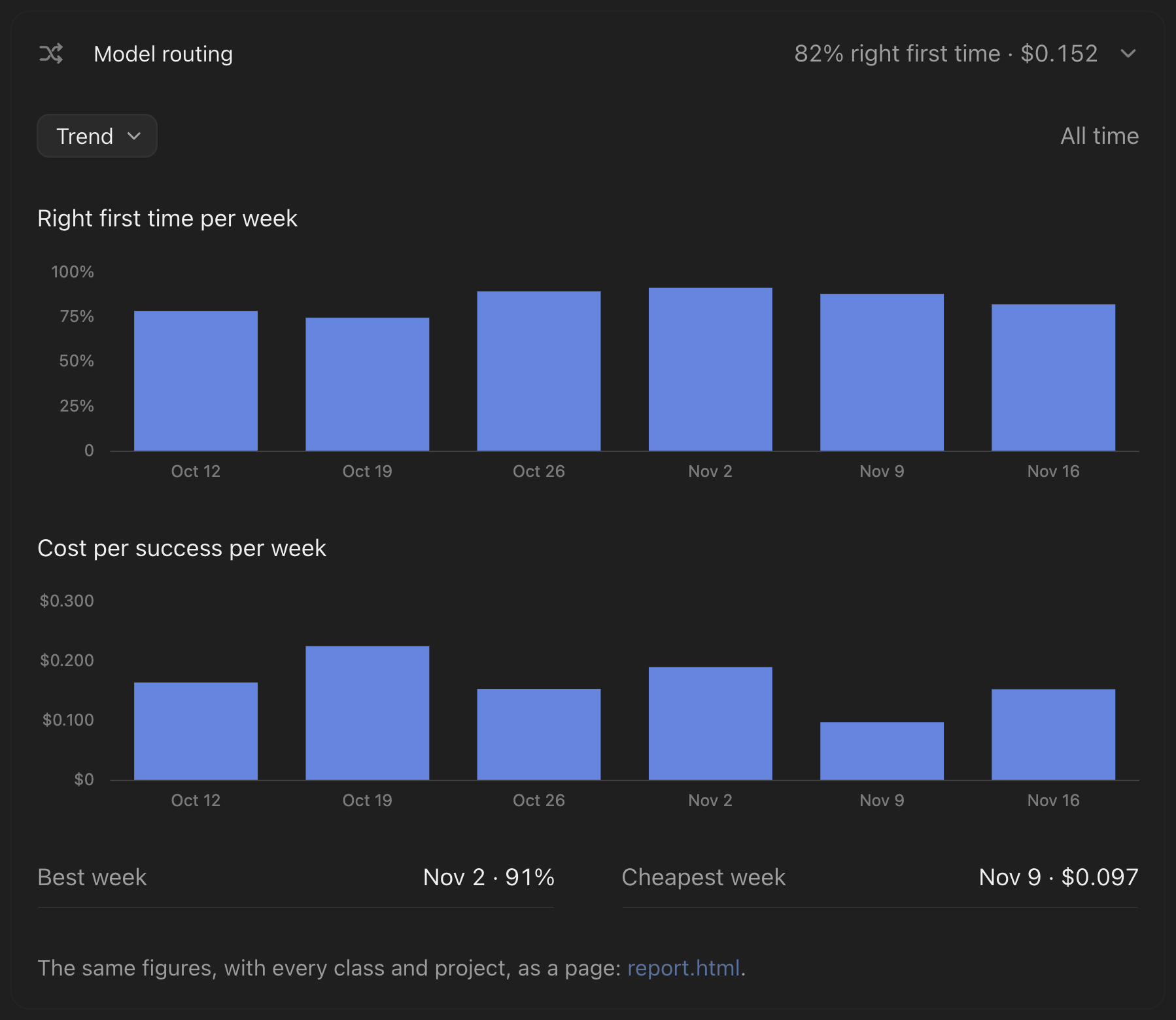
The terminal's Classes tab maps to the desktop app's Task classes view. And the event log — which opens as a file from the terminal — becomes the Log view in the desktop app:
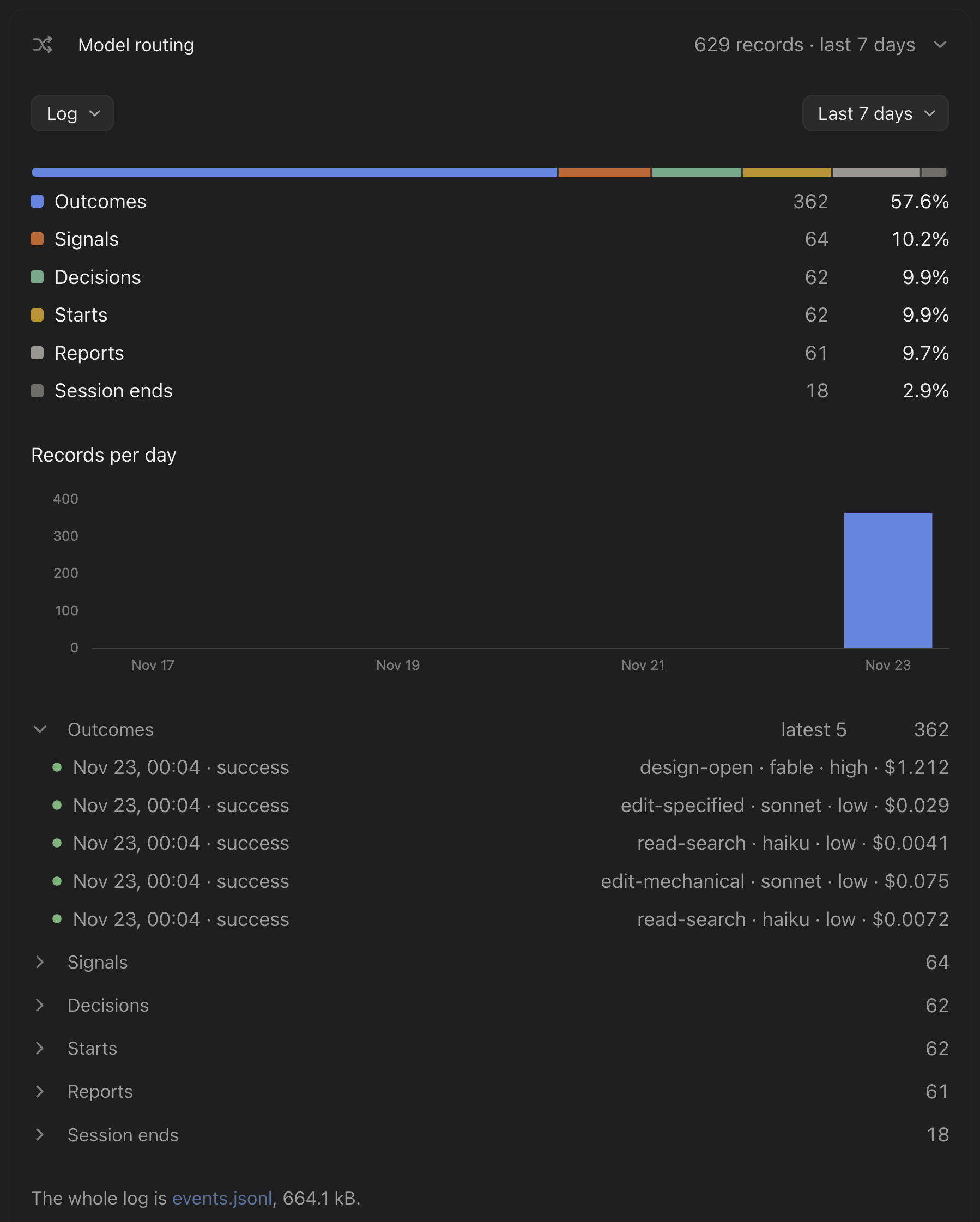
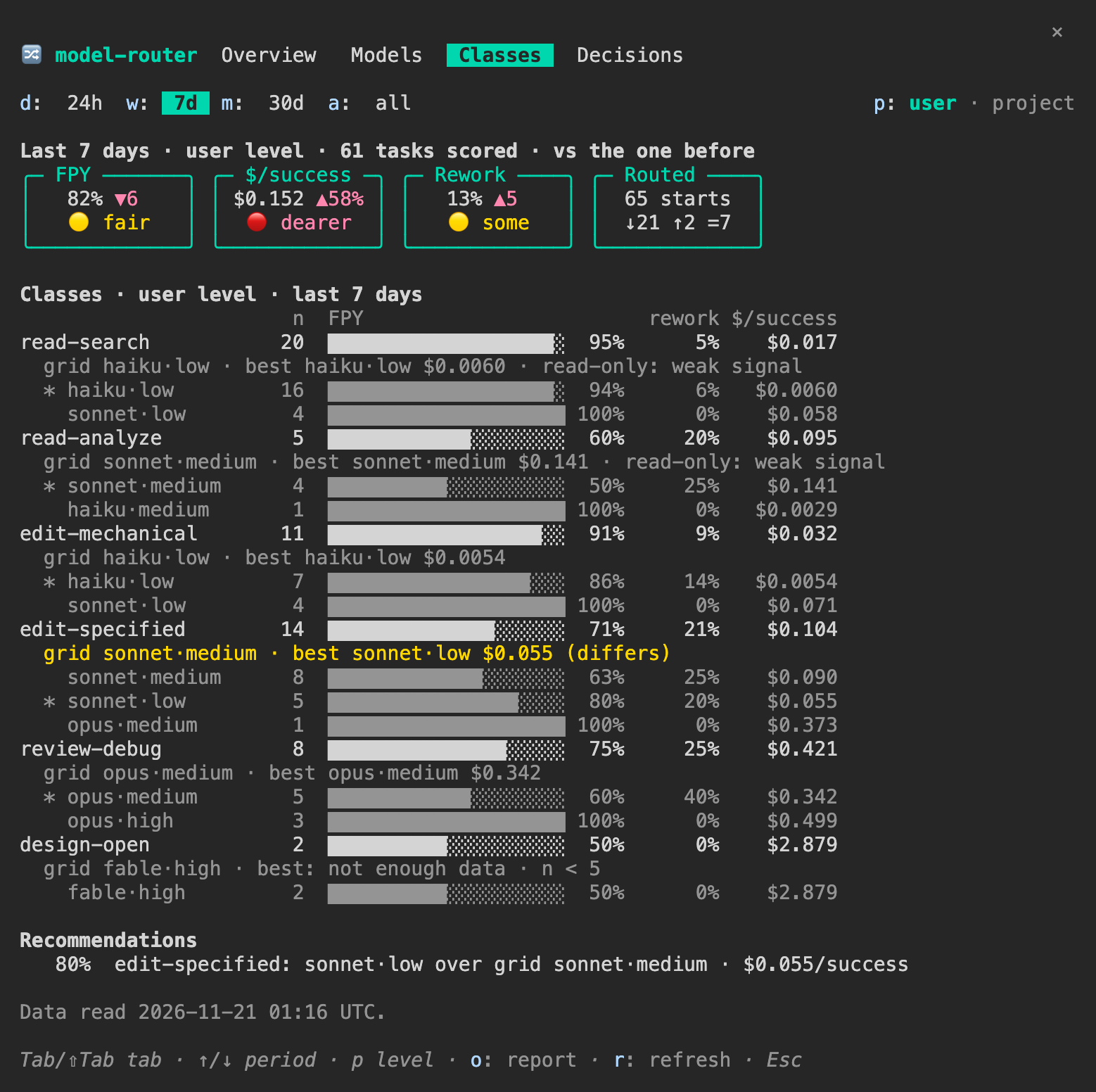
* marks the recommended one). Demo dataIf you want a wider canvas, the report page shows the exact same numbers from the same aggregation, paired with weekly trends and a dedicated card per task class. It is saved to <config dir>/model-router/report.html — the terminal opens it straight in your default browser, while the desktop app links to it from the Trend view.
To see how these views fill in over real work, let's trace what happens from day one through the first month.
A real session
Getting started
Install the plugin, make sure mods are enabled on Claude Code 2.1.329 or later, and start a session. Routing and measurement are on right out of the box. Check that /model-router responds: on a fresh machine with no history yet, Overview will report that no subagents have run.
From there on, just work as usual: every subagent launch prints its 🔀 line, tagged launches turn into tasks, and numbers populate as rework windows close.
Why some screenshots show demo data. Real measurements on the author's machine started on November 21, 2026, so a full week or month of live history doesn't exist yet. The day-one screenshots below are real; the 7-day and 30-day views are built from a demo event log and carry the Demo data badge.
After one day
Expect a handful of scored tasks. Tiles show ⚪ weak because each covers fewer than five tasks, and there is no prior window to compare against yet. The Decisions tab already lists every routing decision along with its reason.
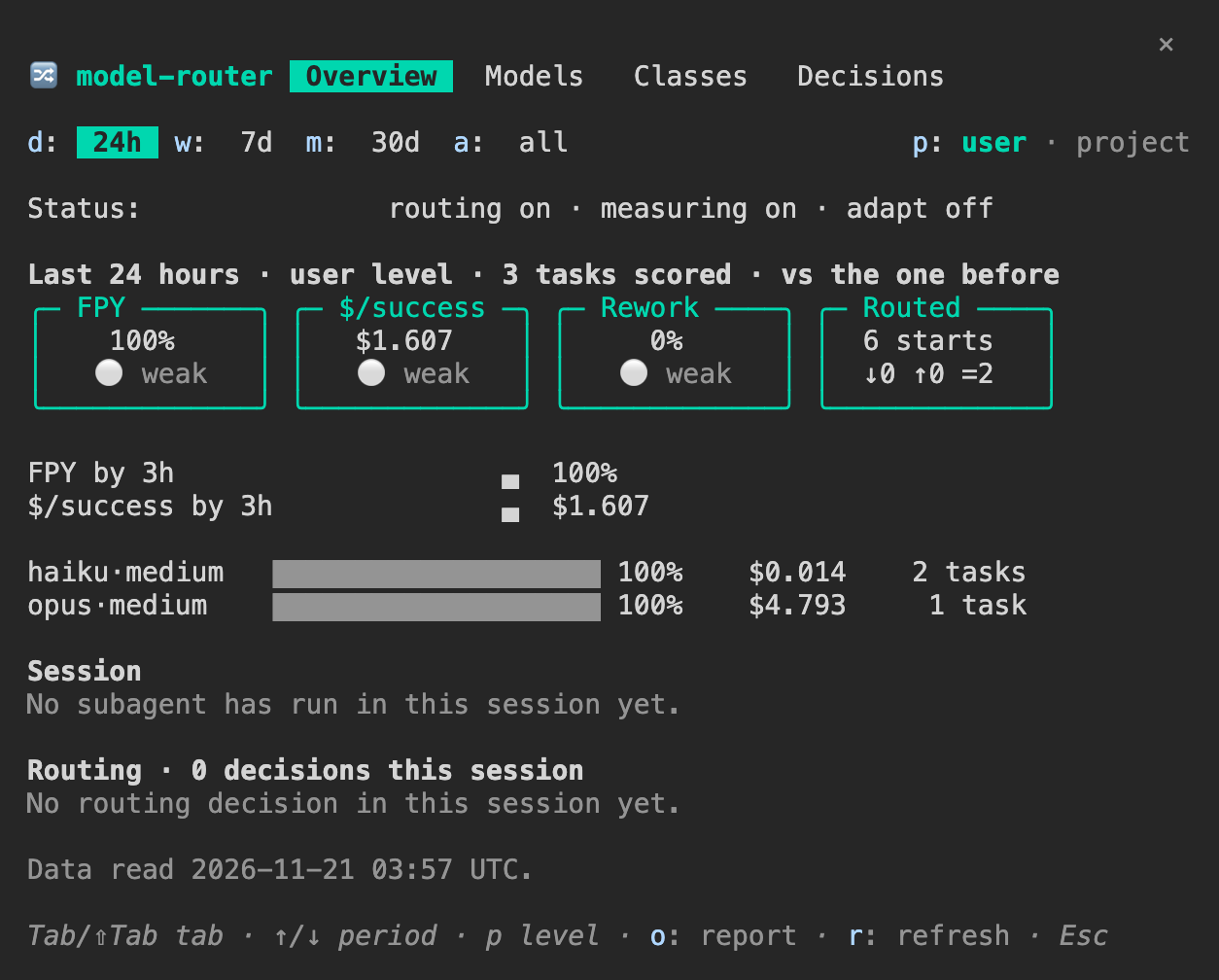
⚪ weak.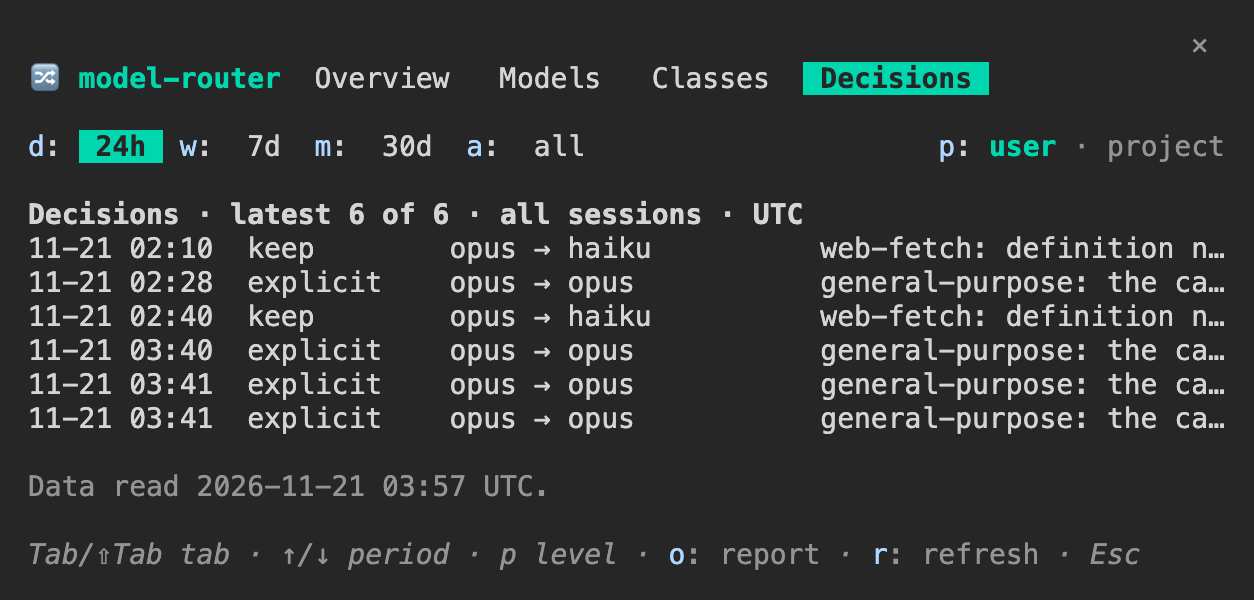
After seven days Demo data
Tiles light up with solid numbers once they cross five tasks, and starting in week two you also get deltas against the previous week. The Classes tab fills out as the first cells clear the three-task mark needed to surface a recommendation.
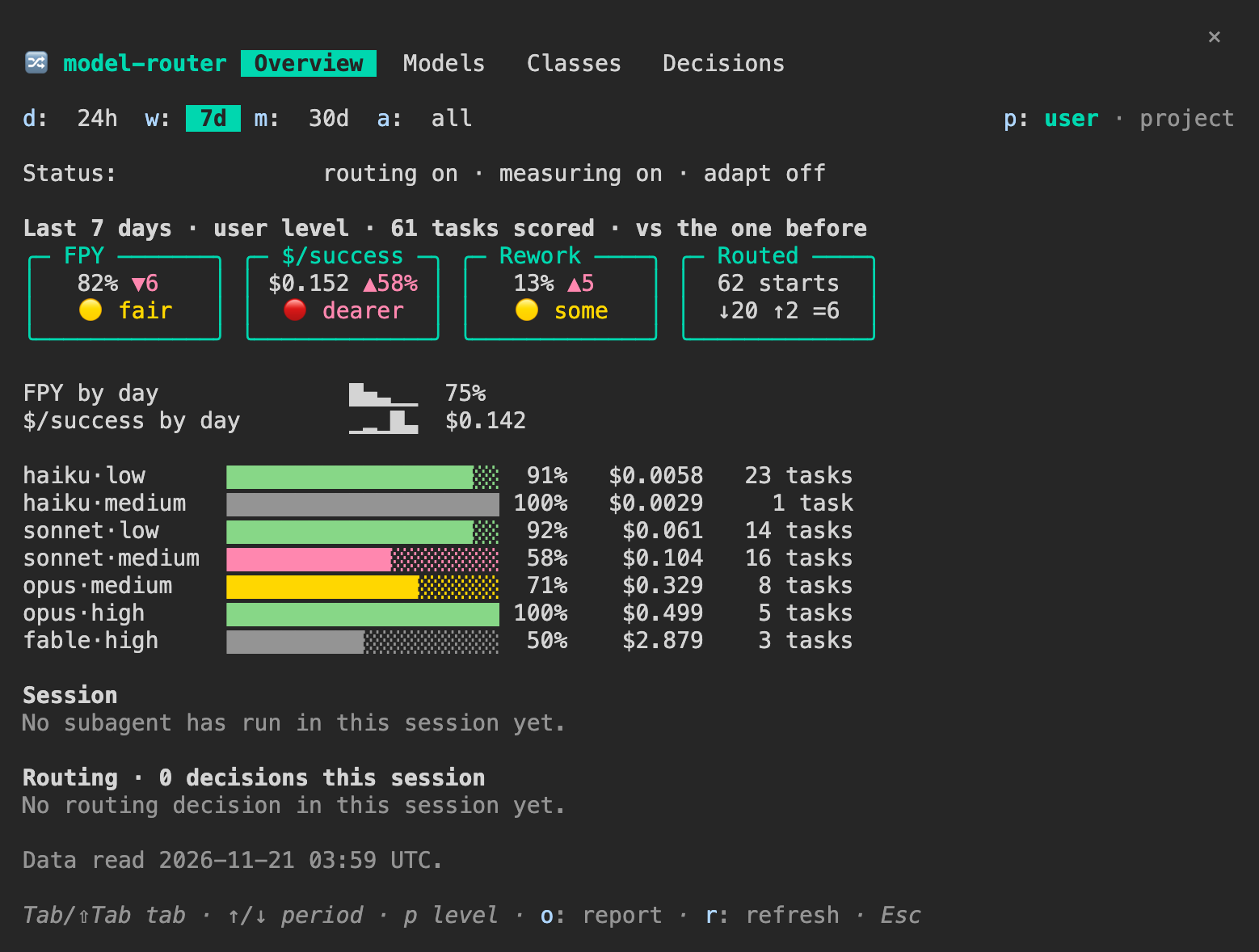
After a month Demo data
Numbers settle down as cells accumulate more tasks, and the 30-day half-life starts doing its job — work from a month ago now carries half weight. This is the right point to review recommendations that diverge from the grid and decide whether to add project exceptions under ## Model routing.
A single project or everything you do
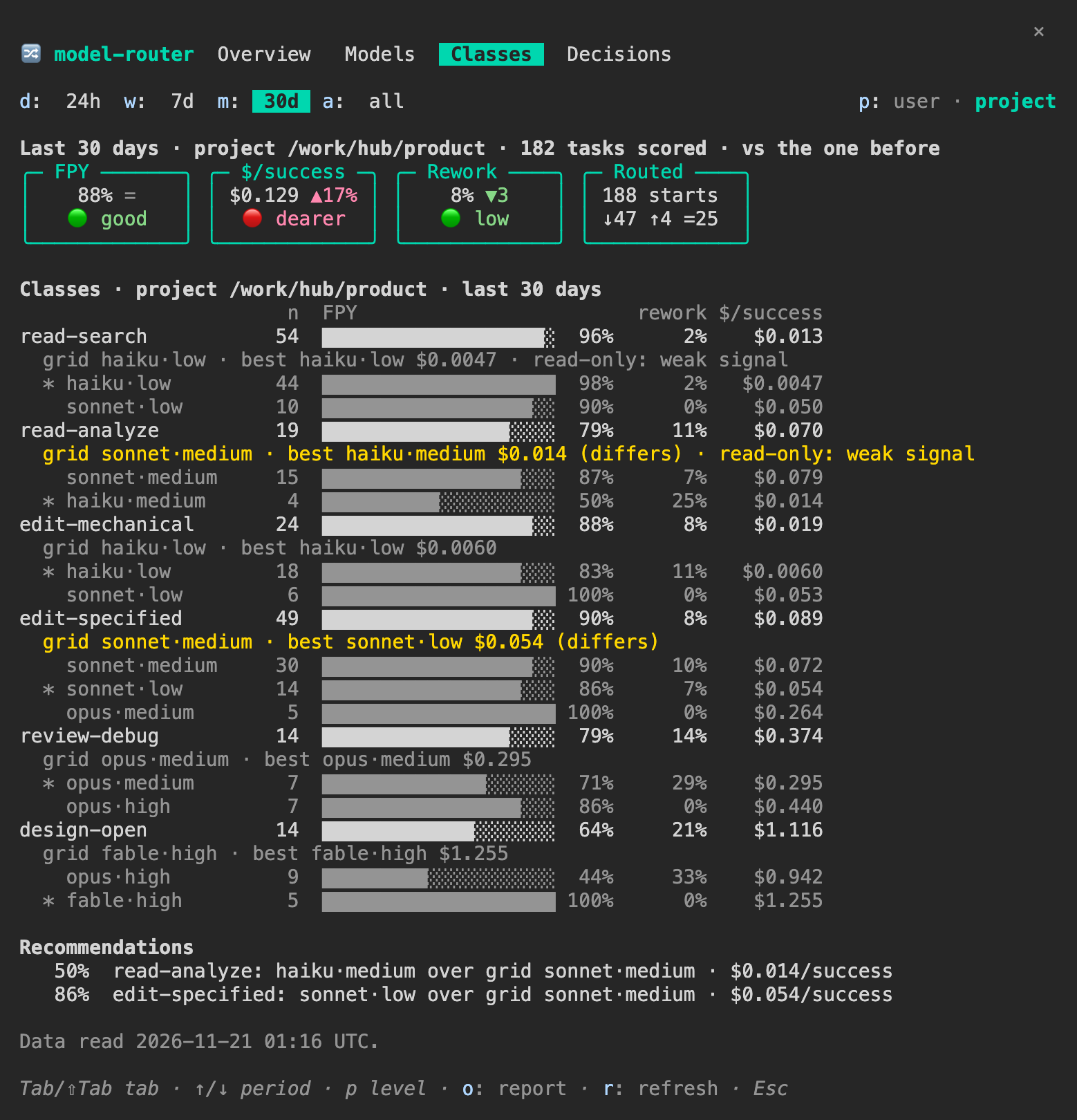
Press p inside the view to toggle between the two observation levels:
- User level: aggregates your data across every project, gives you the broadest picture, and fills up fastest.
- Project level: isolates work on the current repository (identified by git remote or root directory). Samples are smaller, though they tell you whether the grid fits this specific codebase.
If project level looks empty, your history was logged under a different directory or remote.
product repository over 30 days. Demo data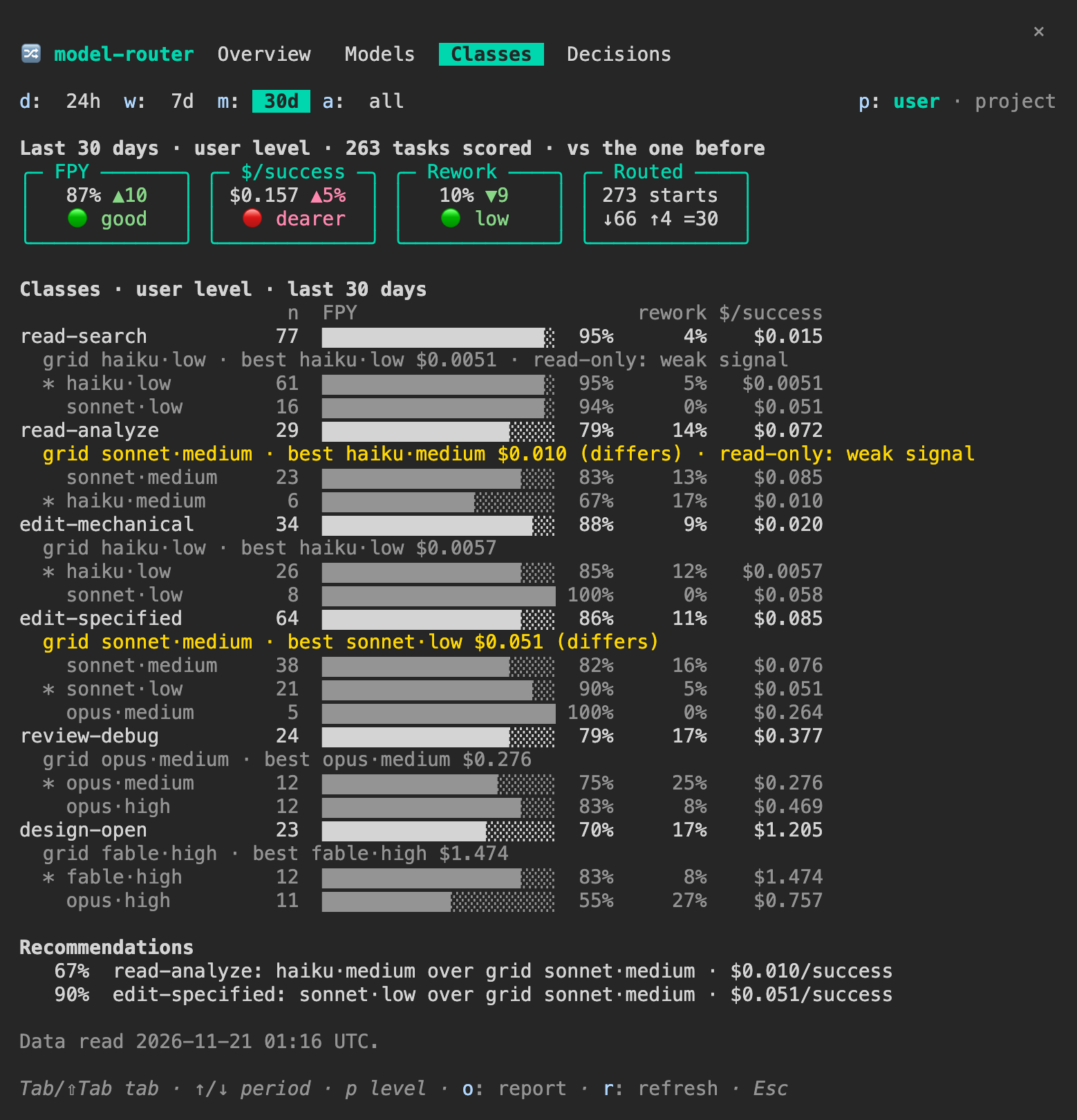
Two practical topics remain before you dive in: where your data lives, and what the current version's limitations are.
Privacy
The plugin never sends anything it measures off your machine. Every file stays local under model-router/ inside your active config directory (CLAUDE_CONFIG_DIR, or ~/.claude otherwise):
- the event log (
events.jsonl), which stores the first 2,000 characters of the two prompts you type after a subagent's report within the rework window, and no other prompts; - the options used during compaction;
- user and project aggregates;
- the HTML report page.
Nothing is ever written inside your repositories. The only outbound call — the judge request on each routed launch — goes to your model provider just like any other request in your session. To stop logging, set measure: false; to wipe your history, delete <config dir>/model-router/.
Limitations
Four limitations of the current version worth keeping in mind:
- Only launches made through the
Agenttool are routed; plugin-internal agents and workflow agents are measured, not routed. - The router only picks
fablefordesign-openand, through version0.3, does not enforce the grid's floor onreview-debuganddesign-open. - Costs are engine estimates; edits made outside the session's tools are not detected.
- For now, data is only measured, not used to make decisions. Adaptive selection based on quality data is planned for a future release.